Hello i purchased a 2024 tax program order # 701-9489788-5320264 Jan 6 2025, bought new pc one need the code to re install 2024 program how do i go about it?


Getting started

For tax year 2023 and later, you must have a TurboTax/Intuit account to install TurboTax Desktop.  


For tax year 2024 and later, when you reinstall TurboTax, you just need to sign into the same account you used when you first installed the program, and you'll get the option to pick your licence code there. You can install up to 3 Windows devices. 


To find your code: View > Summary > Return Counter Summary > Details. 
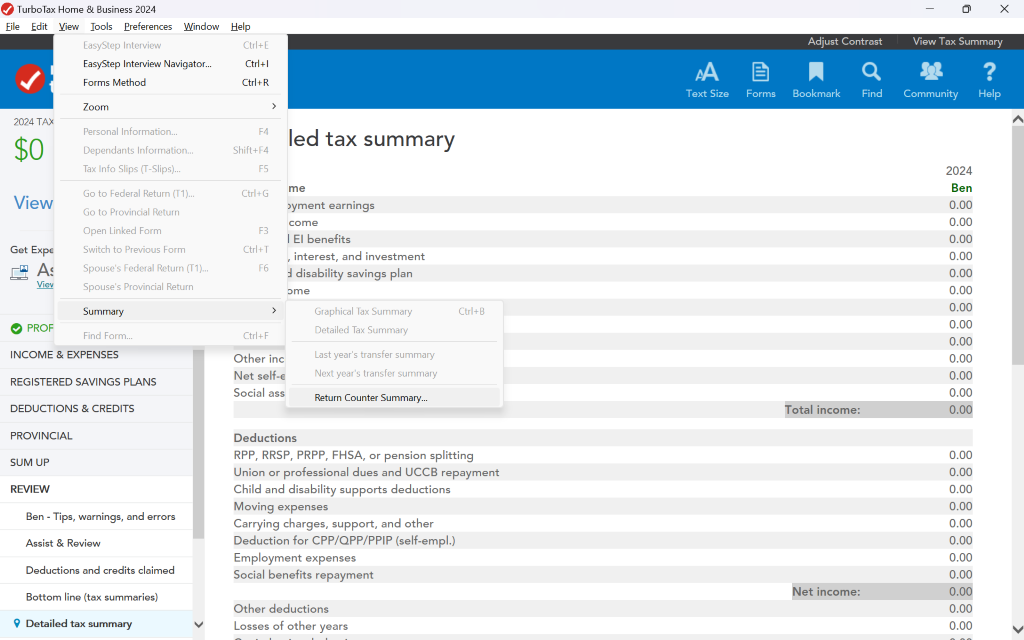
 

Turbo Tax Home & Business 2024 
X 
File 
Edit 
View Tools Preferences 
Window Help 
EasyStep Interview 
Ctrl+E 
Adjust Contrast 
View Tax Summary 
EasyStep Interview Navigator ... 
Ctrl + 1 
AA 
Q 
? 
Forms Method 
Ctrl+R 
Text Size 
Forms 
Bookmark 
Find 
Community 
Help 
Zoom 
> 
1 
2024 TAX 
Personal Information ... 
F4 
$0 
led tax summary 
Dependants Information ... 
Shift+F4 
Tax Info Slips (T-Slips) ... 
F5 
2024 
View 
Go to Federal Return (T1) ... 
Ctrl+G 
me 
Ben 
0.00 
Go to Provincial Return 
byment earnings 
Open Linked Form 
come 
0.00 
F3 
El benefits 
0.00 
Get Expe 
Switch to Previous Form 
Ctrl+T 
,interest, and investment 
0.00 
As 
Spouse's Federal Return (T1) ... 
F6 
d disability savings plan 
0.00 
Viev 
Spouse's Provincial Return 
ome 
0.00 
Summary 
Graphical Tax Summary 
Ctrl+B 
0.00 
1 
0.00 
PROF 
Find Form ... 
Ctrl+F 
Detailed Tax Summary 
0.00 
INCOME & EXPENSES 
Other inc 
Last year's transfer summary 
0.00 
REGISTERED SAVINGS PLANS 
Net self-€ 
Next year's transfer summary 
0.00 
Social ass 
Return Counter Summary ... 
0.00 
DEDUCTIONS & CREDITS 
Total income: 
0.00 
PROVINCIAL 
Deductions 
0.00 
SUM UP 
RPP, RRSP, PRPP, FHSA, or pension splitting 
Union or professional dues and UCCB repayment 
0.00 
REVIEW 
Child and disability supports deductions 
0.00 
0.00 
Ben - Tips, warnings, and errors 
Moving expenses 
Carrying charges, support, and other 
0.00 
Assist & Review 
Deduction for CPP/QPP/PPIP (self-empl.) 
0.00 
Employment expenses 
0.00 
Deductions and credits claimed 
Social benefits repayment 
0.00 
Bottom line (tax summaries) 
Net income: 
0.00 
Other deductions 
0.00 
9 Detailed tax summary 
V 
Losses of other years 
0.00


Thank you for choosing TurboTax.