@steven1350 We are attempting to resolve this error in collaboration with CRA.
Thank you for your patience.
I am having the same/similar issue.
The message says: "You can't designate unused RRSP contributions made in (2023) or before, or designate contributions that you make to your spouse or common-law partner's RRSPs or specified pension plan (SPP), as repayment for HBP and/or LLP."
When I am trying to designate the payment I made in the HBP repayment (for 2024).
I spent an hour on the phone with turbotax customer support to not be given any solution. Are they not aware this is an issue? Please communicate to your team if this is a known issue and that it is being looked into.
Additionally, where is this banner? And what does it say?
Lastly and most importantly will this problem be corrected by April 14? Taxes have a deadline.
We are sorry to hear you are unsatisfied with the service provided by the agent on the phone and we have shared your feedback with the proper TurboTax team.
The error message you are receiving is related to the amount you are trying to designate as a repayment for your HBP.
To designate a repayment for HBP, you must do it through the contributions you made in the current tax year (2024). This means, in your situation, it will be contributions to your RRSP for the 1st and 2nd contribution periods, between 1st March 2024 to March 2nd 2025 (for both contribution periods).
Thank you for choosing TurboTax.
I am experiencing this same issue. I have RRSP contributions to report for both periods of 2024 (Mar-Dec 2024 and Jan-Feb 2025). I am trying to designate all of my RRSP contributions as a HBP repayment, but I am receiving this error message:
You can't designate unused RRSP contributions made in (2023) or before, or designate contributions that you make to your spouse or common-law partner's RRSPs or specified pension plan (SPP), as repayment for HBP and/or LLP
The total I am designating as HBP repayment is the same as my total contributions for 2024. If I report all of my RRSP contributions in one period (Mar-Dec 2024) then I don't receive the error message, but if I do that then my tax return will not match my RRSP contribution receipts. Will this bug be resolved in time to file? Thanks
@LG2222 Please double check that you have the contributions entered in the box for "Contribution amount to your own RRSPs" and not your spouse.
If you are still not able to resolve this issue, please contact our phone support team for more assistance.

i am having the similar issue, please help. Have designated HBP amount though there is no RRSP contribution for this year (2024) for my wife. I was expecting this amount to be added as income but it won't add as an income instead report an error.
having the same issue here, your phone support is a joke, no sorry "an insult". I was told by chat that the wait time is 5 minutes and I will get a call from the help. Received the call in 2 minutes but have been on the call for the last 32 minutes listening to what I can only describe as an awful voices and sounds and some other random sh** seems like people are having chats and talks, I am recording the call and those random voices and will see what I can do about it legally
Definitely last year using this poor service, I am leaving Turbotax for both personal and company use
@bkamb Were you able to get assistance with this issue?
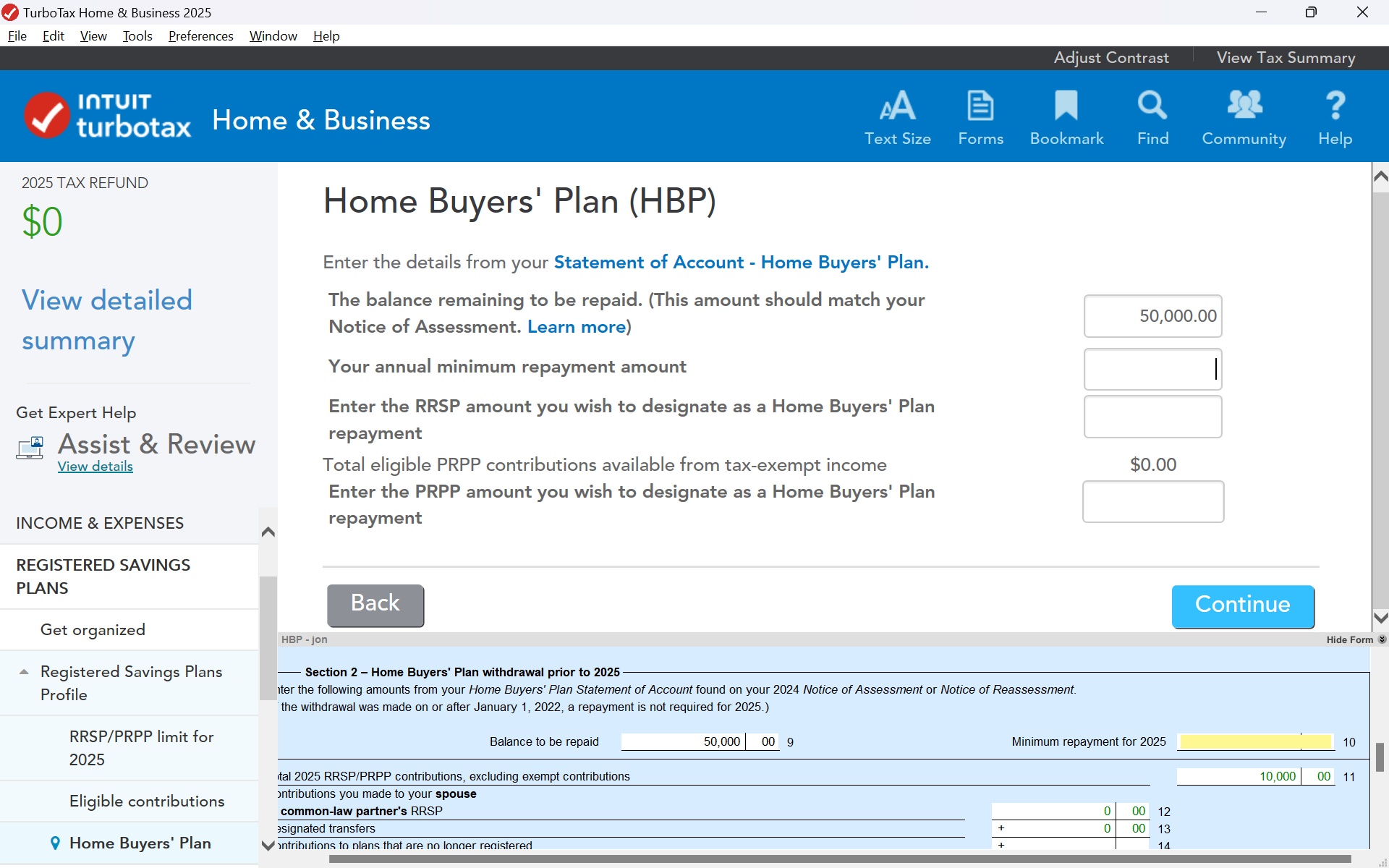
I'm in the exact same position with my 2025 return, I can see it was a bug from last year (TurboTax 2024 - based on the dates of previous posts) but it has raised it's ugly head in TurboTax 2025. Is there not a work around to manually update a form to remove the Home Buyer Plan payment as income or are we having to depend on Turbo Tax for a bug fix? Not impressed that early on in entering income into the system I'm at a dead stop after paying for this software. Turbo Tax takes a long time with bug fixes, this needs to be escalated for sure.
This issue also applies to TurboTax 2025. Just starting my return and I'm at a dead stop. Will there be another bug fix very soon or is there a manual work around by modifing income somewhere in the forms view? Not impressed that I just paid $40 for the software and immediately hit a bug, can't move forward with my return until this gets resolved by your company and I'm sure I'm not the only person impacted in Canada.
@PollyC Are you preparing your return with a spouse? If so please double check that you have the contributions entered in the box for "Contribution amount to your own RRSPs" and not your spouse.
If you are still not able to resolve this issue, please contact our phone support team for more assistance.
Hi Susan, thanks for your quick reply! I'm separated and have stated this in my return, where would I find the check box you just mentioned? I'm filing as an individual.
And for the record, I haven't entered any Home Buyer Plan information into my tax return, I have no idea how TurboTax software even knows about the repayment plan I have. CRA modified the repayment rules and here's an except from the CRA letter I received in October 2024 "Homeowners who have made a withdrawal from their registered retirement savings plan (RRSP) under the HBP will benefit from a grace period of five years, rather than two, before starting to repay. This extension applies to individuals making their first withdrawal between January 1, 2022, and December 31, 2025. According to our records, you made an HBP withdrawal in 2023. You will therefore be able to beginyour repayments in 2028 instead of 2025. The extended grace period applies even if you have already started to make repayments." I am opting not to repay this year and permitted to do that however the software is adding the deferred payment amount as taxable income on my tax return which is incorrect. I did note this was a bug reported and fixed last year in this community that applied to 2024 Tax returns. The same thing is happening to 2025 tax returns meaning the bug is occurring again.
@PollyC If you don't need to make a repayment this year, then make sure there is nothing entered for "Your annual minimum repayment amount".