
- Mark as New
- Bookmark
- Subscribe
- Subscribe to RSS Feed
- Permalink
- Report Inappropriate Content
TurboTax Online - Unable to Add RL-1 (Québec) Slip – Ontario Resident Who Worked Part of Year in Québec
Hello,
I am filing my 2025 return using TurboTax Deluxe Online and I am unable to add my RL-1 slip.
Here is my situation:
I live in Ontario.
I worked part of the year in Québec.
Same employer for the full year.
I received:
One T4 (Ontario portion)
One T4 (Québec portion)
One RL-1 (Québec)
When starting a new return from scratch, I selected that I would enter slips manually and checked T4, T4A, and RL-1 in the Tax Profile section.
However:
I am never prompted to enter the RL-1.
Under Income → T4 – Employment income, I only see options to add T4 slips.
There is no option to add RL-1.
There is no search RL1 in this version to manually add the form.
I recreated three separate returns to ensure I did not skip anything, but the issue persists.
Since I am an Ontario resident who worked part of the year in Québec, I need to enter my RL-1 for:
Québec income tax deducted
RRQ contributions
RQAP contributions
Currently, there is no way for me to input those amounts, which is affecting my balance owing.
Can someone please advise how to manually add an RL-1 slip in TurboTax Online when living in Ontario but working in Québec?
Thank you in advance for your help.


- Mark as New
- Bookmark
- Subscribe
- Subscribe to RSS Feed
- Permalink
- Report Inappropriate Content
Getting started
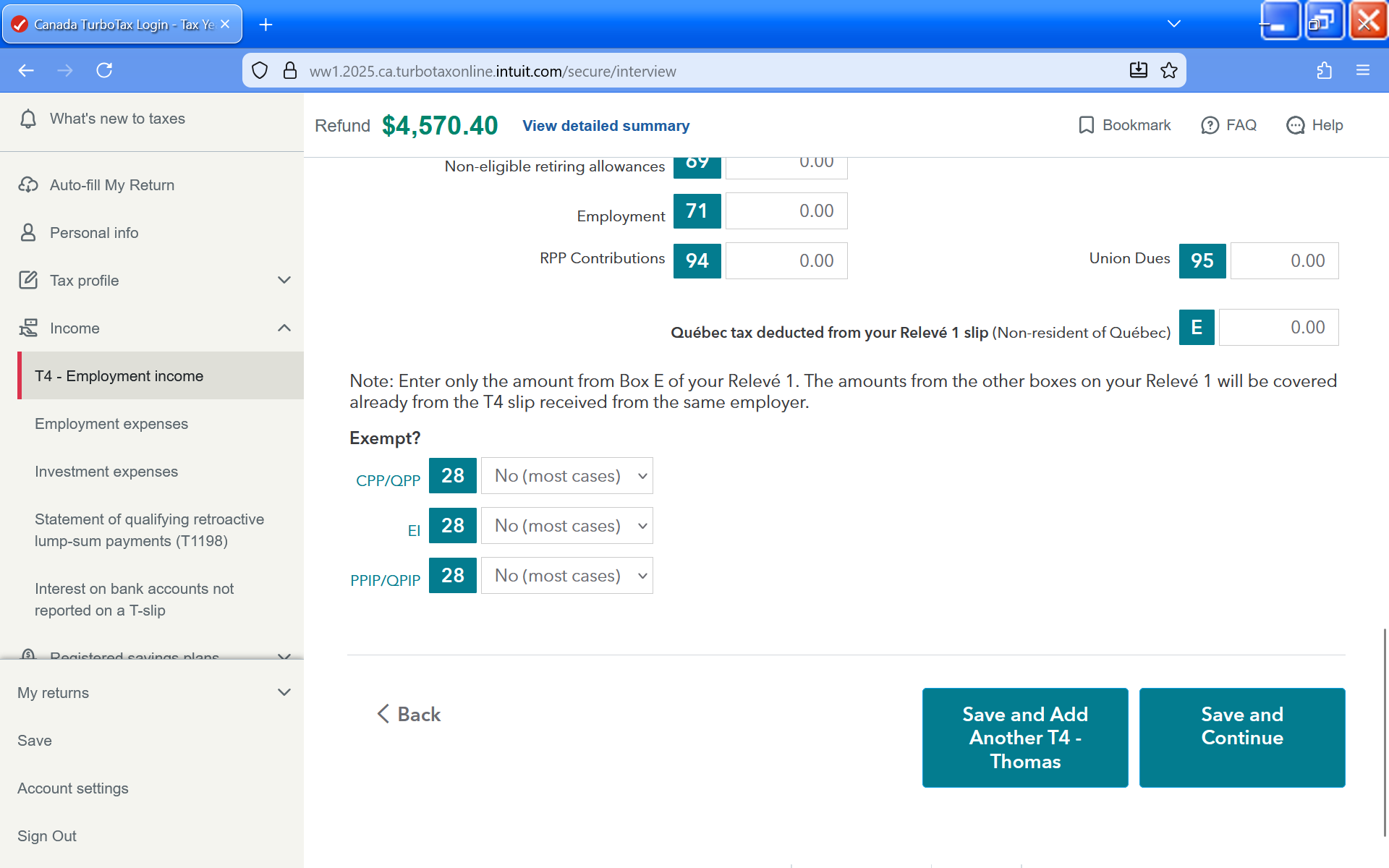
Please scroll down to the bottom of the T4 page. You can enter the amount from Box E of your Relevé 1 there. This is the only amount you need to enter if you were a non-resident of Quebec.

- Mark as New
- Bookmark
- Subscribe
- Subscribe to RSS Feed
- Permalink
- Report Inappropriate Content
Getting started
Is there an error in the system this year? When I select QC as province of work (ON as residence), there is no Box E that appears to enter Releve 1 expenses, as in past years. @TurboTax_Susan
- Mark as New
- Bookmark
- Subscribe
- Subscribe to RSS Feed
- Permalink
- Report Inappropriate Content
Getting started
Hello there, I'm running into the same issue here. There is no box E once I select QC as province of employment. did you end up finding a solution ? please advice, thank you
- Mark as New
- Bookmark
- Subscribe
- Subscribe to RSS Feed
- Permalink
- Report Inappropriate Content
Getting started
Hi, I think I've found the solution, you need to go to your Tax profile and you'll find a section where you can check RL-1 , after doing so the : Québec tax deducted from your Relevé 1 slip (Non-resident of Québec) section will appear . Hope that helps
- Mark as New
- Bookmark
- Subscribe
- Subscribe to RSS Feed
- Permalink
- Report Inappropriate Content
Getting started
Yes - on the left hand menu, choose "Tax Profile" then "Your Tax Profile". You have to make sure the box for RL1 is checked off.
