
- Mark as New
- Bookmark
- Subscribe
- Subscribe to RSS Feed
- Permalink
- Report Inappropriate Content
Importing your data
@TurboTaxBrenda, I originally reported this issue in 2024 (look above the date and details), and I can confirm that the very same issue is still present in 2025 version, as @Bragaf reported . I am using TurboTax Standard 2025.
Sorry to have to say this, but this looks bad. This should be very easy fix for your developers … but obviously nobody really cares enough to fix it, and people are frustrated with a reason.
In the easy mode your software does not let us make the transfer to QC.
I was able to find a solution by switching to Forms mode, and enter my amount manually in the appropriate field (and I did the same workaround last year, since your company didn't fix the issue like you promised they would)


- Mark as New
- Bookmark
- Subscribe
- Subscribe to RSS Feed
- Permalink
- Report Inappropriate Content
Importing your data
Can you please clarify where you see that error? Is it in the review section or when you go to File? If we can get a screenshot or picture, it would be great.
Thank you for choosing TurboTax.
- Mark as New
- Bookmark
- Subscribe
- Subscribe to RSS Feed
- Permalink
- Report Inappropriate Content
Importing your data
This years version 2025
also reached out to support number which unfortunately was not able to help. Solution would be to change it manually on the forms.
- Mark as New
- Bookmark
- Subscribe
- Subscribe to RSS Feed
- Permalink
- Report Inappropriate Content
Importing your data

Here you go your screenshot.
yes I have made sure that my t4 shows that o work in the province of Ontario
yes my province of residence is Quebec
yes I have done it 3 times, twice I did it without importing the files from cra and revenu Québec. Still did not let me enter the value and this is the screenshot
i had to redo all of it on UFILE and that worked perfectly.
after 10+ years of using this software this is the second year in a row that I have this problem.
Last year I submitted without doing the manual 45% transfer and now I have to pay thousand of dollar ahead of time to renevu Quebec because of the submission last year. Like I said this is very frustrating and paying 60$ for the software that doesn’t take into consideration QC is very disappointing.
i already for a refund at your convenience
thank you
.
- Mark as New
- Bookmark
- Subscribe
- Subscribe to RSS Feed
- Permalink
- Report Inappropriate Content
Importing your data
There is something missing, as it shows that you have no eligible tax to transfer. Then you entered an amount, which would give you an error.
We reviewed as a couple and entered the amount in both T4s—the only way you would have this issue is if you accidentally entered an amount in box E of your RL1.
If box E in your RL1 already had tax deducted, you need to verify with your employer if that tax was in fact paid to Quebec. If yes, then you would be ineligible.
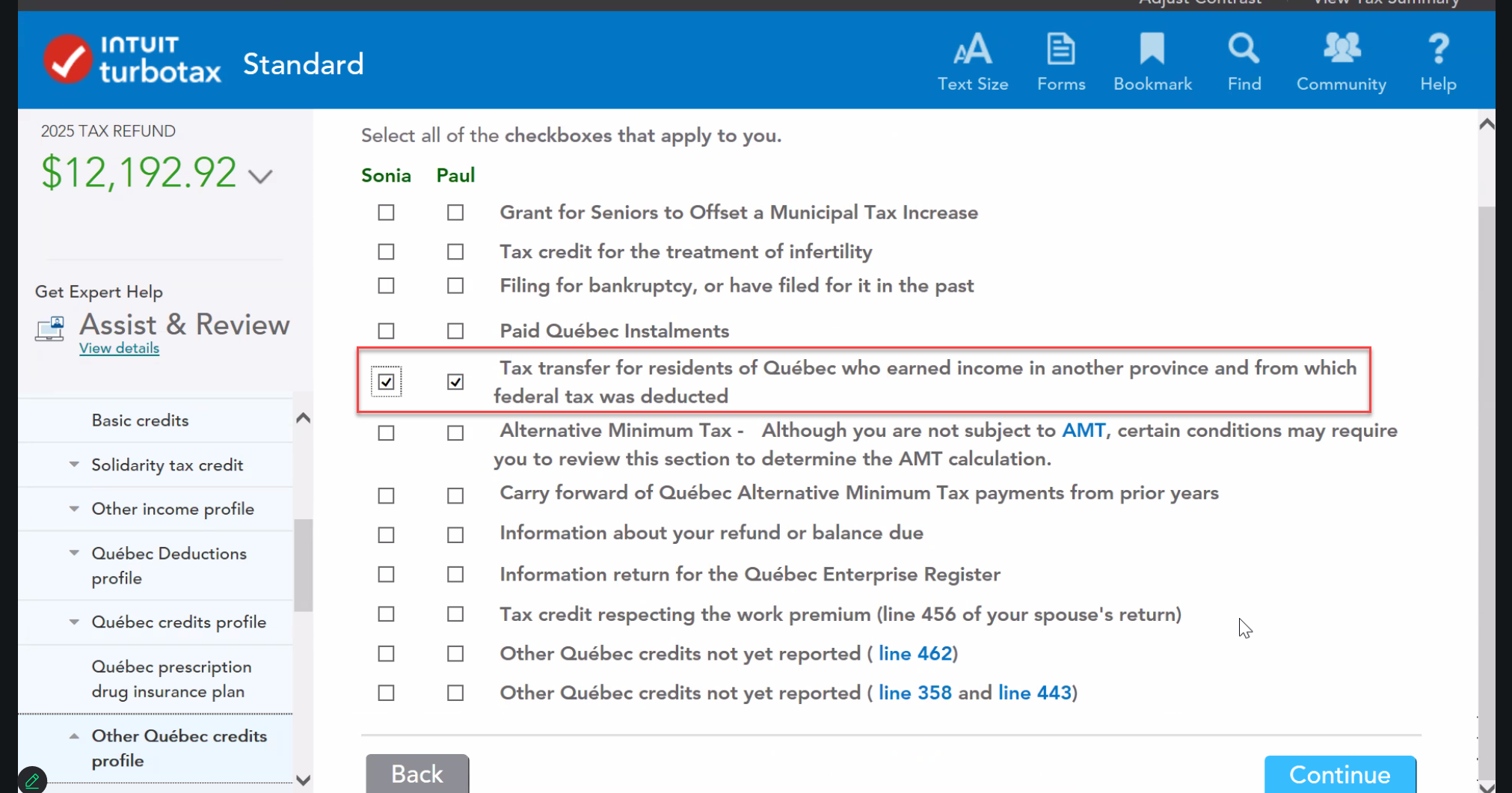
Otherwise this is how it goes through:
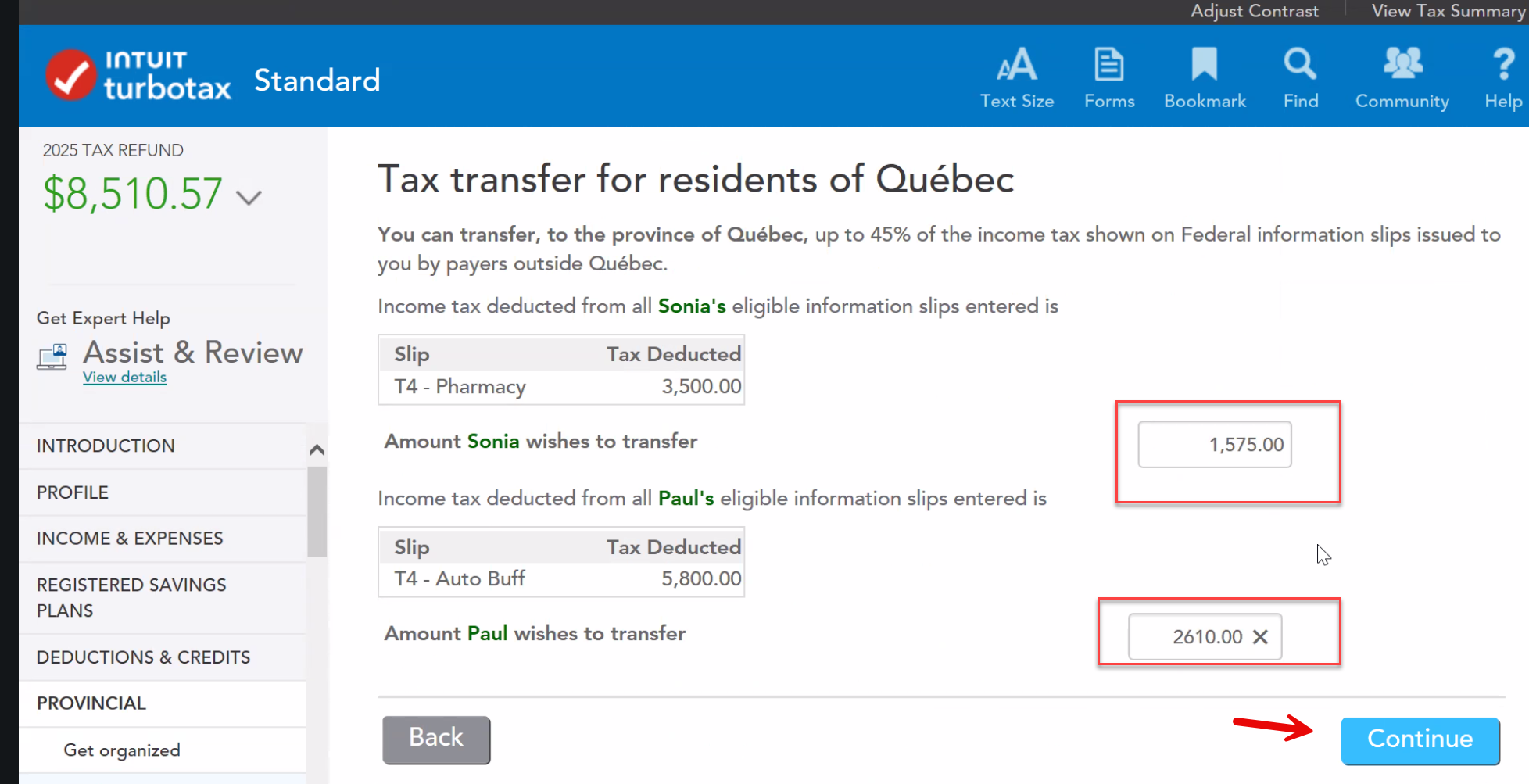
As you see an amount under each person, you need to calculate 45% of each amount and enter it in the boxes provided.
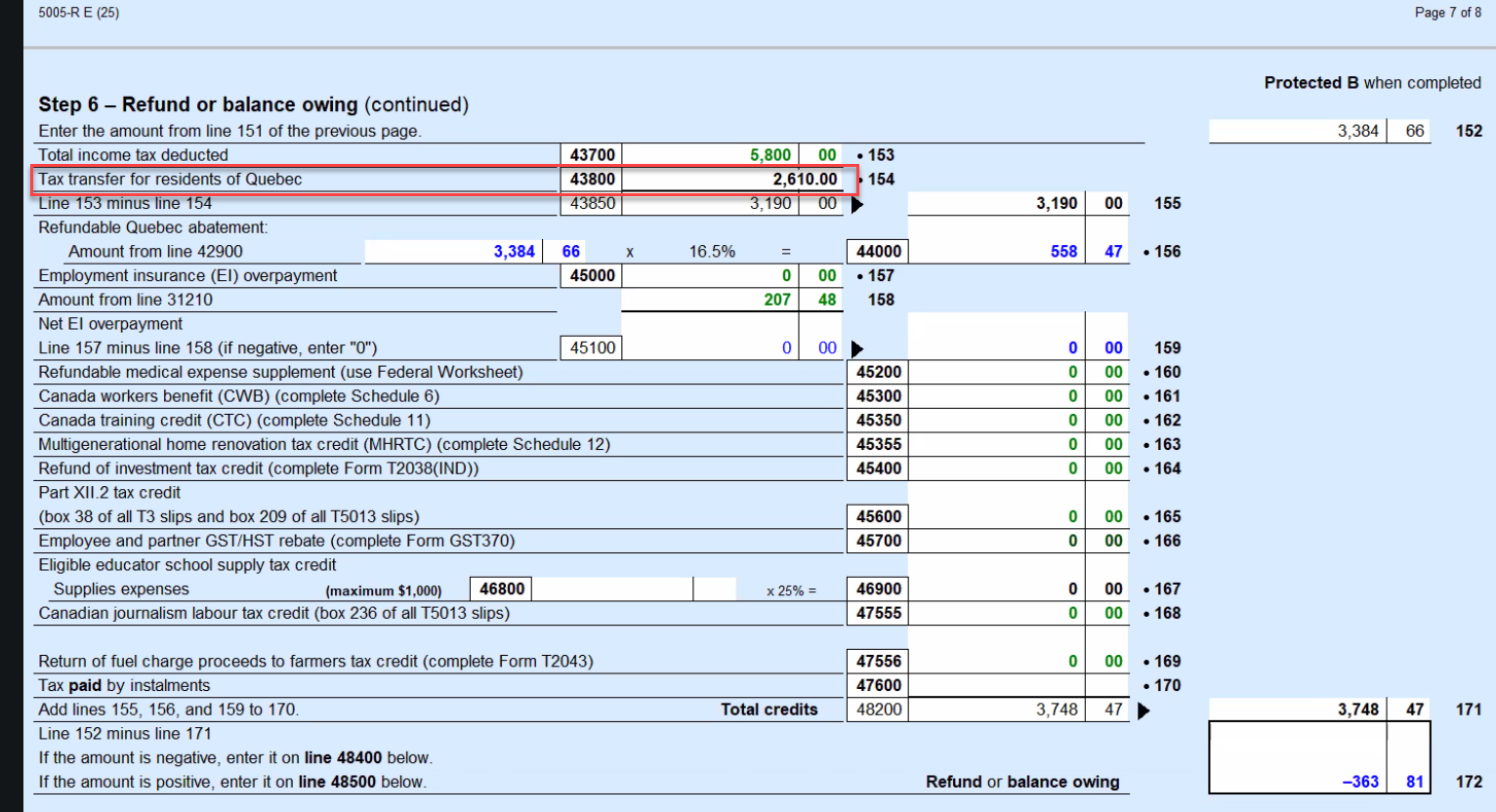
As you can see below it automatically transfers to the FORMS
Thank you for choosing TurboTax.
- Mark as New
- Bookmark
- Subscribe
- Subscribe to RSS Feed
- Permalink
- Report Inappropriate Content
Importing your data
"If box E in your RL1 already had tax deducted, you need to verify with your employer if that tax was in fact paid to Quebec. If yes, then you would be ineligible. "
In my case I work in ON and live in QC, and only part of the QC tax was paid through my employer. As a result I overpaid the federal tax and have to pay tax owing to QC. So yes there is amount entered in my RL1 (the amount that was paid to QC tax), but I should still be able to transfer the tax owed to QC if it respect following:
“You can transfer, to the province of Quebec, up to 45% of the income tax shown on Federal information slips …”. Why would TurboTax make it ineligible in this case? And why I am eligible to do this if I use "Forms" mode but not in "Easy mode"?
- Mark as New
- Bookmark
- Subscribe
- Subscribe to RSS Feed
- Permalink
- Report Inappropriate Content
Importing your data
I am not going through all the screenshots I had in detail. This is an example where I went to forms and tried to continue from here. I am not here to troubleshoot, simply stating the facts that there is a bug in the system that has yet to be addressed.
like I said before I tried several times before calling support and during support entering differently. I only took screenshot of this one which was one of the trials I did.
Also I mentioned before I called support.
sorry guys I am no longer entertaining this conversation.
thank you and hope in the future this gets resolved.
good luck
- Mark as New
- Bookmark
- Subscribe
- Subscribe to RSS Feed
- Permalink
- Report Inappropriate Content
Importing your data
Would one of you be willing to send us your return so that we can enter the issue with our investigation team? Please let us know, and we will email you the required information.
Much appreciated.

- Mark as New
- Bookmark
- Subscribe
- Subscribe to RSS Feed
- Permalink
- Report Inappropriate Content
Importing your data
I have the premium desktop version for 2025 this year and I am still having issues with transferring the ammounts. in the easy step it shows no available tax transfer but if I go to the forms and manually change the line 43800 then the box will appear on the easy form but gives me an error saying it is over the 45%, doesn't matter if I put the right amount or just 1$. this also makes it so I can't netfile my taxes.
How can we fix this?

- Mark as New
- Bookmark
- Subscribe
- Subscribe to RSS Feed
- Permalink
- Report Inappropriate Content
Importing your data
@GavinScharfe If you finish your return, and then make the change in Forms mode and then file without going through EasyStep again, does it give you an error when you try to NETFILE?
