
 Open TurboTax
 Sign In
Why sign in to the Community?
- Submit a question
- Check your notifications


- TurboTax Support
- :
- Discussions
- :
- Navigating TurboTax
- :
- Investments & rentals
- :
- Re: Saskatchewan Tax question - are others experiencing a problem with the Turbo Tax program fail...
- Subscribe to RSS Feed
- Mark Topic as New
- Mark Topic as Read
- Float this Topic for Current User
- Bookmark
- Subscribe
- Printer Friendly Page

- Mark as New
- Bookmark
- Subscribe
- Subscribe to RSS Feed
- Permalink
- Report Inappropriate Content
Saskatchewan Tax question - are others experiencing a problem with the Turbo Tax program failing to claim provincial tax credit for Home Renovations?


- Mark as New
- Bookmark
- Subscribe
- Subscribe to RSS Feed
- Permalink
- Report Inappropriate Content
Saskatchewan Tax question - are others experiencing a problem with the Turbo Tax program failing to claim provincial tax credit for Home Renovations?
You can follow the instructions below to claim the Saskatchewan Home Renovation Tax Credit calculated summary and make sure nothing has been overlooked.
1. Select the Provincial Section on the left-hand side of your TurboTax return.
Click on Provincial Tax Credit
A page will appear where you will select "Home Renovation Tax Credit," as seen below.
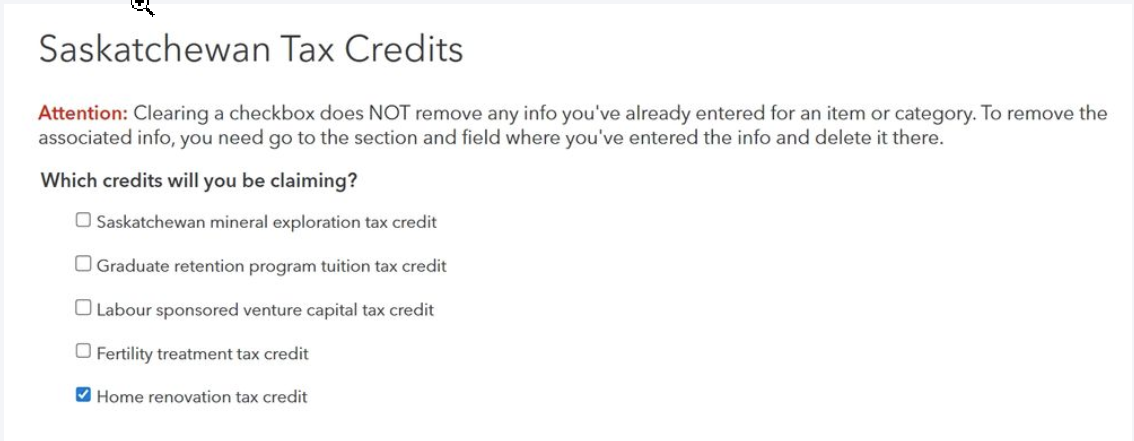
Then click Continue.
2. Answer the following question on the page shown below.
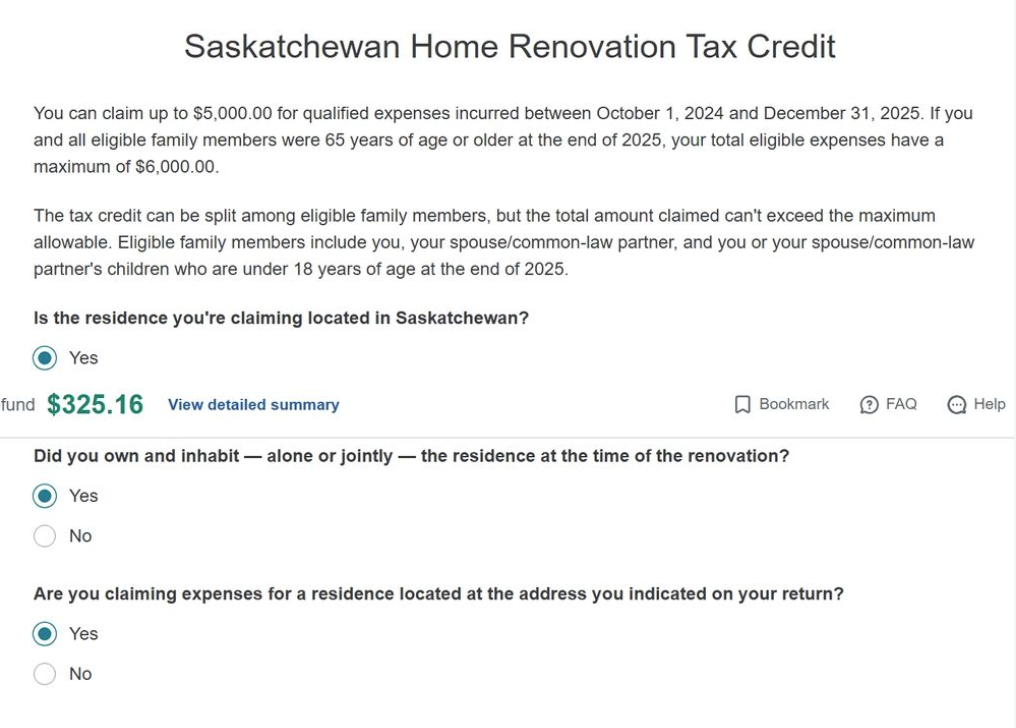
Then click continue.
3. On the next page, you can add your home renovation tax credit information.
"Fill in the correct date, supplier name, description, and amount."
Then click "Add".
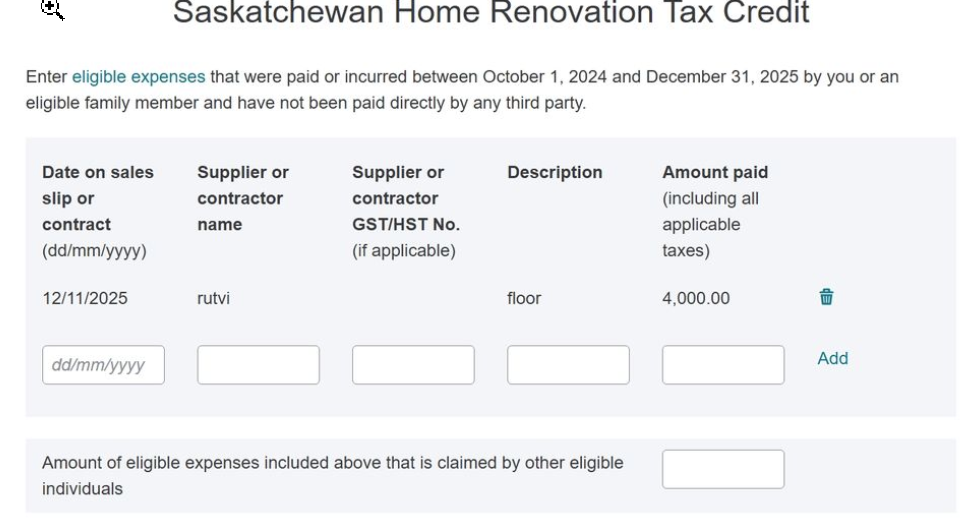
Then click continue.
4. At last, you will see the "Saskatchewan tax and credits summary."

This is the page where you will see the calculated summary for the Home Renovation Tax Credit under "Nonrefundable Tax Credit."
Thank you for choosing TurboTax.

- Mark as New
- Bookmark
- Subscribe
- Subscribe to RSS Feed
- Permalink
- Report Inappropriate Content
Saskatchewan Tax question - are others experiencing a problem with the Turbo Tax program failing to claim provincial tax credit for Home Renovations?
Inputting the itemized list for the tax credit (Saskatchewan Home Renovation Tax Credit) does not work! As soon as you click on "add" the page errors out saying "the requested page cannot be found". I phoned for help, it was no help at all. I tried two different browsers with the same result. It is Turbo Taxes problem. When I suggested this (nicely) I was disconnected. Great Customer Service. They had my phone number and did not bother to phone me back. I filed without the deduction. This is very poorly written software. I will not waste any more time or money on this package in the future.

- Mark as New
- Bookmark
- Subscribe
- Subscribe to RSS Feed
- Permalink
- Report Inappropriate Content
Saskatchewan Tax question - are others experiencing a problem with the Turbo Tax program failing to claim provincial tax credit for Home Renovations?
@BrownDR42 We've reported this issue to our development team, and they are looking into it. You'll get an email when the ticket is completed.
