
- Mark as New
- Bookmark
- Subscribe
- Subscribe to RSS Feed
- Permalink
- Report Inappropriate Content
Interface not working between CPT30 and T4
I stopped CPP contributions for February 2025. Paid 1 month of contribution to CPP. T4 shows 1 month of contributions in Box 16 as it should. My employer has submitted the same amount to CRA on their T4 Summary. On the page where I enter my T-4, I have two choices. Yes I am exempt or No I am not exempt. I cannot choose Yes I am exempt because an error comes up showing that I cannot be exempt because I have entered an amount in Box 16. In my opinion there needs to be a 3rd choice Partial Year Exemption and the number of months that allows you to use both an amount in Box 16 and also use the partial exemption. Currently I show an amount owing to CRA. If I use form CPT30, I can show that I have elected to be exempt and sent the form to CRA. No matter what date I choose for the exemption date the amount owing does not change. It should. If I was only exempt for 1 month or 11 months it should change the amount owed to CRA. It does not. This is very frustrating. I spoke for an hour this morning with Turbo Tax and they tell me I need to talk to my employer (not sure why) or CRA. It is a turbo tax issue. Anyone using this version of turbo tax with a partial year CPP exemption will have the same problem.


- Mark as New
- Bookmark
- Subscribe
- Subscribe to RSS Feed
- Permalink
- Report Inappropriate Content
Troubleshooting
The amount owing isn't changing because the software is still applying the full annual exemption to your single month of work. To fix this, you must find the Schedule 8/CPP optimization screen and locate the box for 'Number of months of CPP-eligible earnings. ''Manually change that '12' to a '1.' This forces the software to prorate your exemption and should adjust that 'amount owing.
Ensure to follow these steps:
In TurboTax Canada (Online or Desktop), follow these steps to reach the month-adjustment screen:
On the T4 Screen: * Set the "CPP/QPP Exempt" dropdown/checkbox to "No" (this clears the Box 16 error).
Ensure Box 26 (Pensionable Earnings) matches your Box 14 (unless you have specific non-pensionable benefits).
Navigate to the CPP Summary: * In the left-hand menu, go to Tax Topics > Pension Profile (or search for "CPP" in the Find/Search tool).
Look for the section titled "CPP/QPP contributions on self-employment and other earnings" or "Schedule 8."
The CPT30 / Months Section:
You will see a screen titled "CPT30 - Election to stop contributing to the CPP."
Select "Yes, I filed a CPT30 with my employer."
Enter the date the election became effective (the first day of the month after you gave it to your employer).
The "Number of Months" Override:
There is a specific field on the Schedule 8 / CPP screen (or sometimes just after the CPT30 entry) that asks for the "Number of months you were required to contribute to CPP."
Change this number from 12 to 1.
If you've completed all of that. Please private message me the screenshots so that I can forward them to the assigned department for further investigation.
Thank you for choosing TurboTax.
- Mark as New
- Bookmark
- Subscribe
- Subscribe to RSS Feed
- Permalink
- Report Inappropriate Content
Troubleshooting
That is a great answer thank you; however, two problems. To the left of my screen there is no "Tax Topics" and when I go to forms there is no Schedule 8. I am currently on the telephone with Turbo Tax screen sharing and they cannot find these either.

- Mark as New
- Bookmark
- Subscribe
- Subscribe to RSS Feed
- Permalink
- Report Inappropriate Content
Troubleshooting
In EasyStep mode, you can search for "CPP" using the Find tool.
In Forms mode, you can search for "Schedule 8" by clicking on the Forms button.

- Mark as New
- Bookmark
- Subscribe
- Subscribe to RSS Feed
- Permalink
- Report Inappropriate Content
Troubleshooting
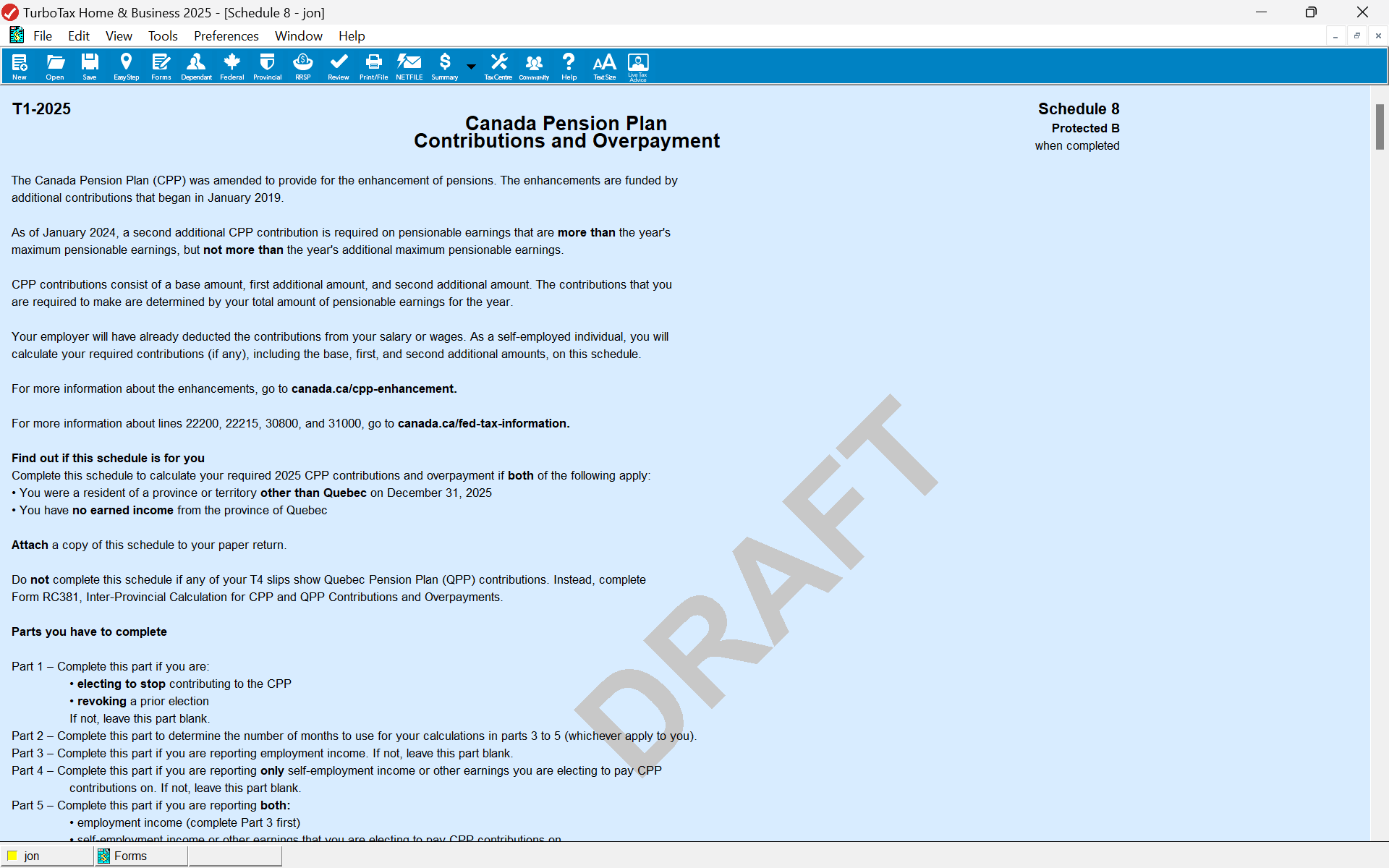
Please send me a screen shot of Schedule 8 in the forms because I nor the turbo tax person I am on the telephone with can find it.
- Mark as New
- Bookmark
- Subscribe
- Subscribe to RSS Feed
- Permalink
- Report Inappropriate Content
Troubleshooting
@tepmurt1 If you are using TurboTax Online, then you will have to wait until NETFILE opens on Monday, February 23, 2026 at 6:00 a.m. (Eastern Time). Then you can print out the archive of your return and view Schedule 8.
- Mark as New
- Bookmark
- Subscribe
- Subscribe to RSS Feed
- Permalink
- Report Inappropriate Content
Troubleshooting
I am using Turbo Tax Deluxe 2025 and none of the Schedules that you are suggesting are included nor can I add them in forms.

- Mark as New
- Bookmark
- Subscribe
- Subscribe to RSS Feed
- Permalink
- Report Inappropriate Content
Troubleshooting
Ok I will wait until February 23, 2026 to see what I can find...... an hour back and forth here in the community and more than 2 hours on the telephone with Turbo Tax...... It's been a frustrating day! Do I recommend Turbo Tax ...... I will see after February 23rd!
