
- Mark as New
- Bookmark
- Subscribe
- Subscribe to RSS Feed
- Permalink
- Report Inappropriate Content
FHSA asking for information and showing in error when I never said I had one!
During the review in Turbo Tax the program said there was a FHSA error, surprise for me as I never checked that I had or contributed to one. Now it wants me to indicate the year I first opened my first FHSA... ?
I can't seem to clear this error, what can I do to clear it or do I need to delete every thing that I have entered and start again?
Thanks!


- Mark as New
- Bookmark
- Subscribe
- Subscribe to RSS Feed
- Permalink
- Report Inappropriate Content
Troubleshooting
Try going into Forms mode and look to see if any forms that you don't need are open. If you do see one that you don't need, choose Edit > Forms > Clear Current Form, then Edit > Forms > Close Unused Forms to get rid of it.

- Mark as New
- Bookmark
- Subscribe
- Subscribe to RSS Feed
- Permalink
- Report Inappropriate Content
Troubleshooting
Hmmm, that didn't seem to work, cleared the form, then closed unused forms and the review still brings up this.

Additionally, I did the steps again, cleared the form, closed unused forms, saved my work and closed then reopened Turbo Tax went to Easy Step Method, then jumped ahead to begin the review and see this. Looks like the "No" box has been cleared and the error is back.

- Mark as New
- Bookmark
- Subscribe
- Subscribe to RSS Feed
- Permalink
- Report Inappropriate Content
Troubleshooting
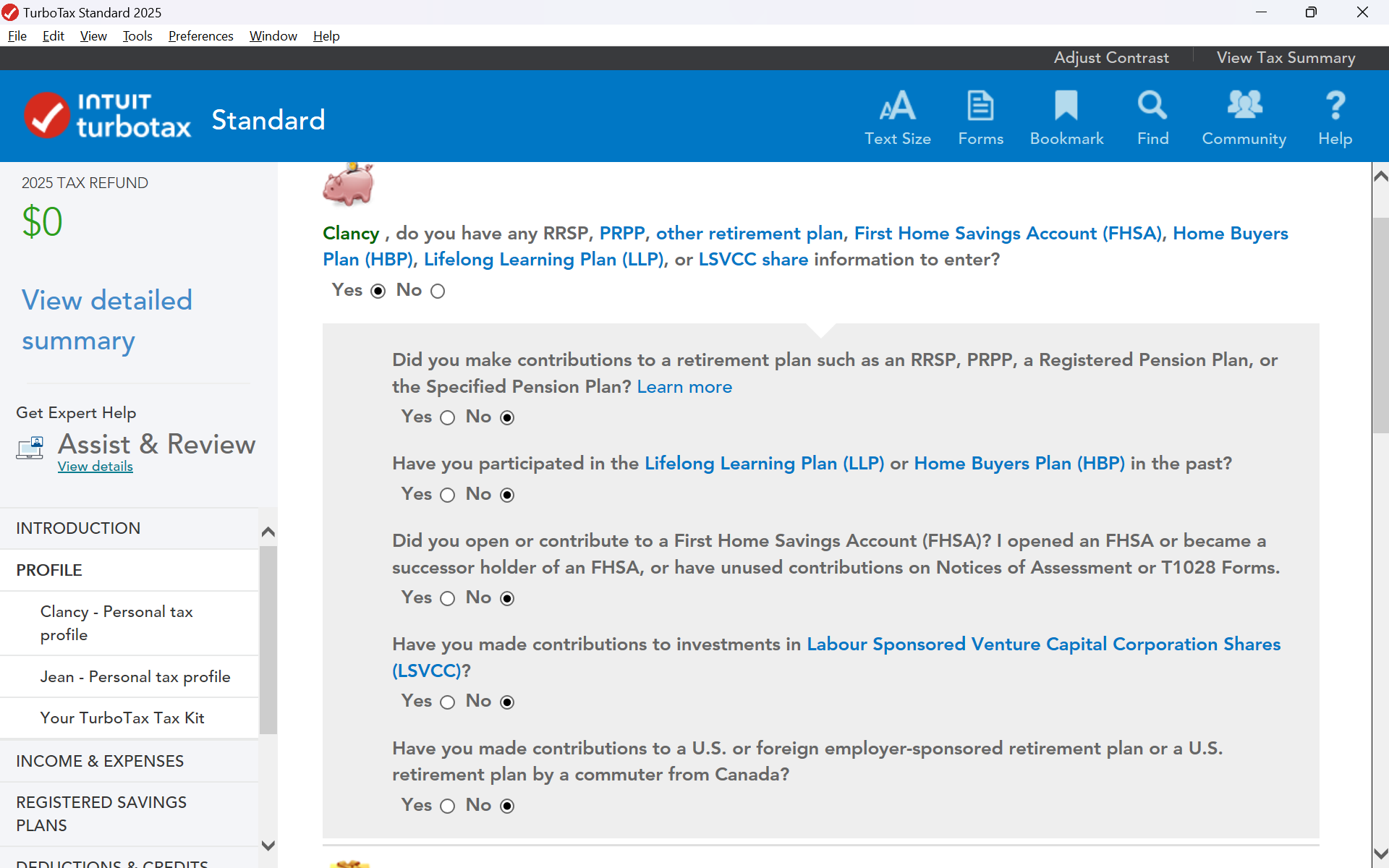
In EasyStep Mode, select Profile> Your Personal Tax Profile, and then continue to the 2nd page. In the top section, make sure that the question regarding the FHSA is set to "No".
If you are still not able to resolve this issue, please contact our phone support team for more assistance.
- Mark as New
- Bookmark
- Subscribe
- Subscribe to RSS Feed
- Permalink
- Report Inappropriate Content
Troubleshooting
Yes, I did verify that answer, it is set to "no". So I will call into phone support or erase and start over.
Thanks.

- Mark as New
- Bookmark
- Subscribe
- Subscribe to RSS Feed
- Permalink
- Report Inappropriate Content
Troubleshooting
I spoke with phone support, they couldn't clear up the issue, suggested it could be a form coming from CRA during the import process, I said doubtful as I did not see anything to do with FHSA.
The agent agreed with my suggested course of action: 1) delete saved data and try again with CRA import 2) delete saved data and start again and manually enter all tax information.
Will let you all know...
- Mark as New
- Bookmark
- Subscribe
- Subscribe to RSS Feed
- Permalink
- Report Inappropriate Content
Troubleshooting
Well, this is not looking good, I tried a new set of returns with only the carry over from TurboTax 2024, all manual T-Slip entry, not only do I still get the FHSA warning message, but it skipped over all of the spousal entries and presented them as warnings during review! I don't think any of these 'warnings' are valid, I know that I entered our email id's at the very beginning and part way though, yet it brings this up as a warning.

Does TurboTax 2025 pull some type of FHSA information from previous years and is getting this wrong?
Is this error transmitted to CRA when E-filing?
Not sure what to do now, de-install TurboTax 2025, then download and re-install? Ignore the warnings?

- Mark as New
- Bookmark
- Subscribe
- Subscribe to RSS Feed
- Permalink
- Report Inappropriate Content
Troubleshooting
@user17736823234 These are not errors—you can bypass the warnings and proceed to Netfile.
- Mark as New
- Bookmark
- Subscribe
- Subscribe to RSS Feed
- Permalink
- Report Inappropriate Content
Troubleshooting
Thank you for correcting me, yes they are warnings, not errors. Still a bit disconcerting to have the program a 'warning' about things that either do not apply (No FHSA information was ever entered), and asking one to check information that is clearly already entered into the program. I might have been tempted to ignore them earlier, but when TurboTax suggested that they should be fixed, and when that was attempted large red lines go across the screen, most of us look for a resolution. ☹️
After 7+ runs through the program, and eventually bypassing all automated steps like carry forward amounts from 2024 or CRA T-Slip imports I had decided that I would ignore the warnings as they did not apply to me and proceed to Netfile.

I do appreciate the assistance I did get both here and from telephone support.
Regards,
