
 Open TurboTax
 Sign In
Why sign in to the Community?
- Submit a question
- Check your notifications


Turn on suggestions
Auto-suggest helps you quickly narrow down your search results by suggesting possible matches as you type.
Showing results for
- Subscribe to RSS Feed
- Mark Topic as New
- Mark Topic as Read
- Float this Topic for Current User
- Bookmark
- Subscribe
- Printer Friendly Page

- Mark as New
- Bookmark
- Subscribe
- Subscribe to RSS Feed
- Permalink
- Report Inappropriate Content
CNIL
How do I enter CNIL from last year's notice of assessment?
Topics:
posted
February 24, 2026
6:21 AM
last updated
February 24, 2026
6:21 AM
5 Replies


- Mark as New
- Bookmark
- Subscribe
- Subscribe to RSS Feed
- Permalink
- Report Inappropriate Content
CNIL
To enter your CNIL from a previous year, go to the Carry Forwards section under the Income or Investment profile. Enter your cumulative investment income and expenses here; TurboTax will automatically post these amounts to Part 3 of Form T936 to calculate your current limit.
Thank you for choosing TurboTax.
February 24, 2026
7:57 AM
- Mark as New
- Bookmark
- Subscribe
- Subscribe to RSS Feed
- Permalink
- Report Inappropriate Content
CNIL
I still don't see it.
@TurboTaxAniqua
Some context, I moved back to Canada in 2024. So 2024 was the first year of filing Cdn income tax since 2013.
My 2024 Notice of Assessment says
1. $<x> for 2024
2. unused net capital losses from other years of $<y>.
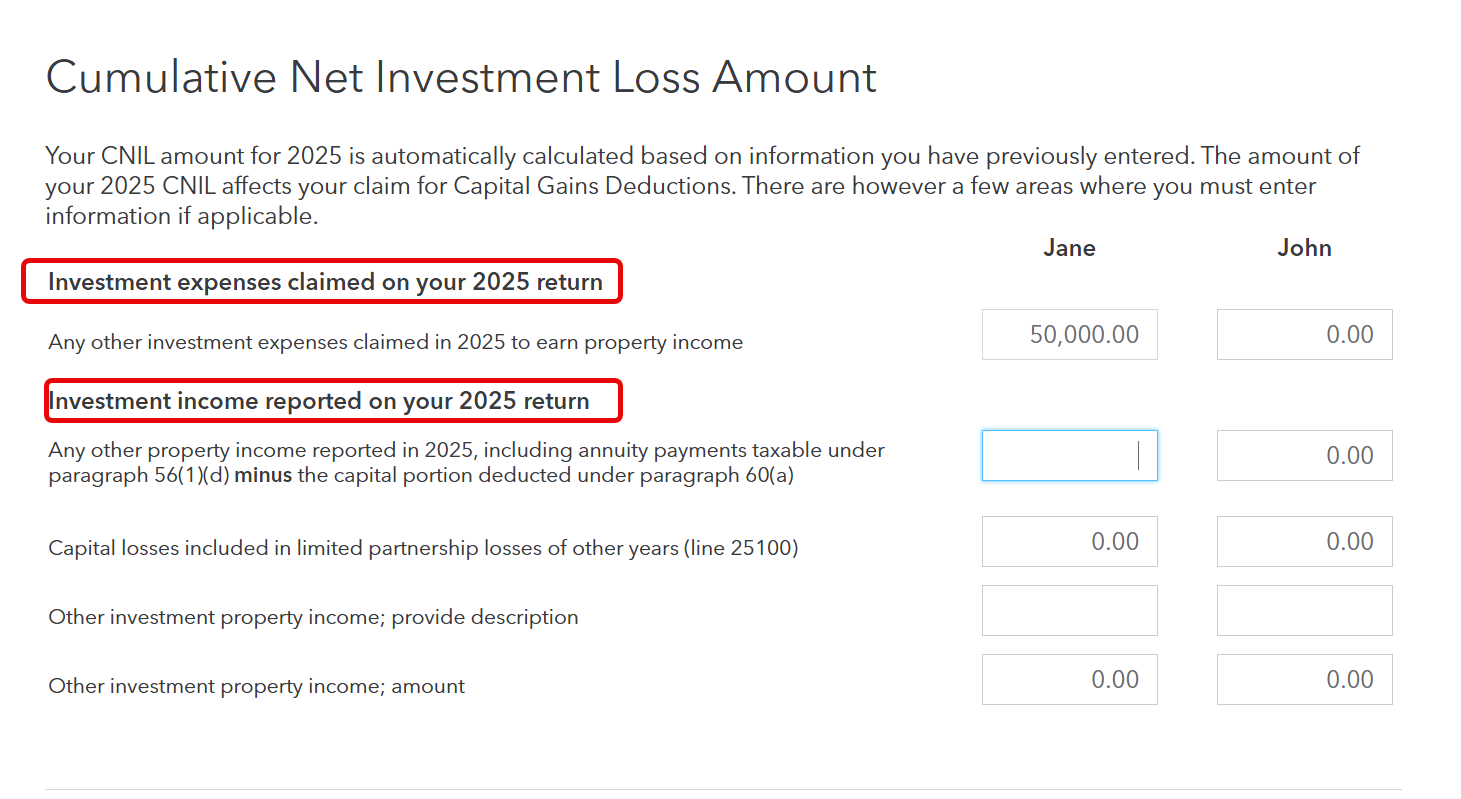
In the Carry Forwards section under Investments Profile, the only things I can enter are investment expenses and income reported on my 2025 return. I assume this will calculate the loss for 2025, but it will not include CNIL from other years.
February 24, 2026
10:36 AM
- Mark as New
- Bookmark
- Subscribe
- Subscribe to RSS Feed
- Permalink
- Report Inappropriate Content
CNIL
Refer to the screenshots below; for Tax Year 2025, you can add information here:
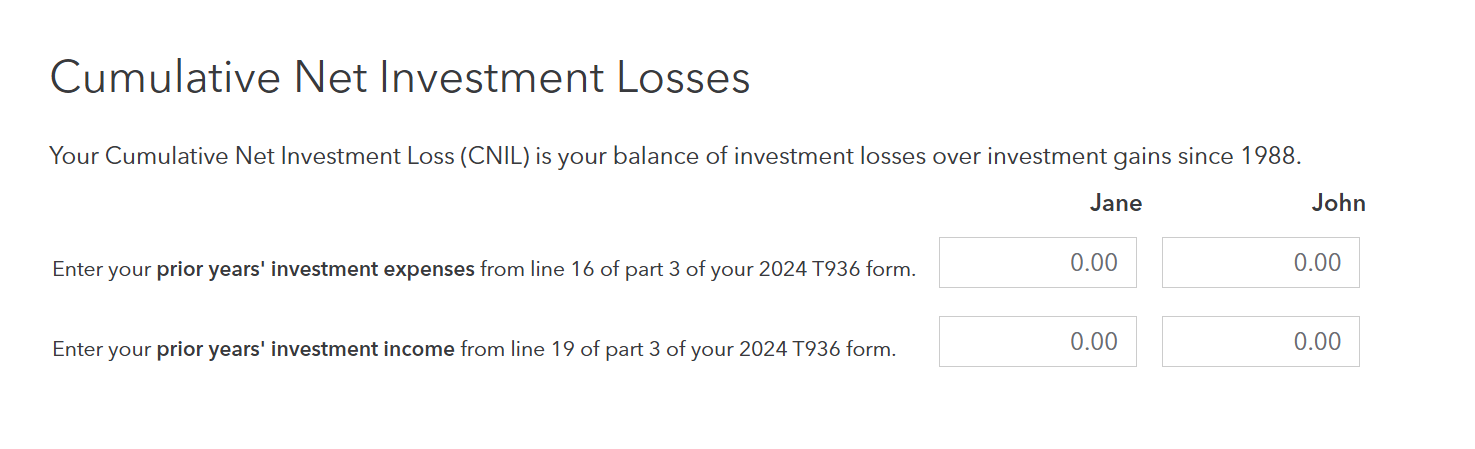
For previous years: Your Cumulative Net Investment Loss (CNIL) is your balance of investment losses over investment gains since 1988. You will add information on the very next page.
If you're using TurboTax Desktop, use Easy Step mode:
- Proceed to the Income and Expenses section.
- Find the Investments Profile page.
- Check the box for "Calculation of cumulative net investment loss (CNIL) (T936)."
- Proceed through the screens until you reach the CNIL entry page. You will see boxes specifically for "Prior year investment expenses" and "Prior year investment income."
You generally only need to enter this if you are claiming the Capital Gains Deduction (Line 25400) for selling small business shares or farm/fishing property. If you aren't claiming that deduction, a CNIL balance won't actually change your tax refund this year, though it’s still good practice to keep it updated.
Hope this helps!
February 24, 2026
12:02 PM

- Mark as New
- Bookmark
- Subscribe
- Subscribe to RSS Feed
- Permalink
- Report Inappropriate Content
CNIL
How can I enter the CNIL carry forward amount from previous years in TurboTax Online?
a month ago

- Mark as New
- Bookmark
- Subscribe
- Subscribe to RSS Feed
- Permalink
- Report Inappropriate Content
CNIL

4 weeks ago
Unlock tailored help options in your account.
Related Content

peter-m
New Member

jmm7
Returning Member