
 Open TurboTax
 Sign In
Why sign in to the Community?
- Submit a question
- Check your notifications


- TurboTax Support
- :
- Discussions
- :
- Troubleshooting
- :
- Troubleshooting
- :
- Error in form TP-1079.8.BE-V
Turn on suggestions
Auto-suggest helps you quickly narrow down your search results by suggesting possible matches as you type.
Showing results for
Announcements
- Subscribe to RSS Feed
- Mark Topic as New
- Mark Topic as Read
- Float this Topic for Current User
- Bookmark
- Subscribe
- Printer Friendly Page

- Mark as New
- Bookmark
- Subscribe
- Subscribe to RSS Feed
- Permalink
- Report Inappropriate Content
Error in form TP-1079.8.BE-V
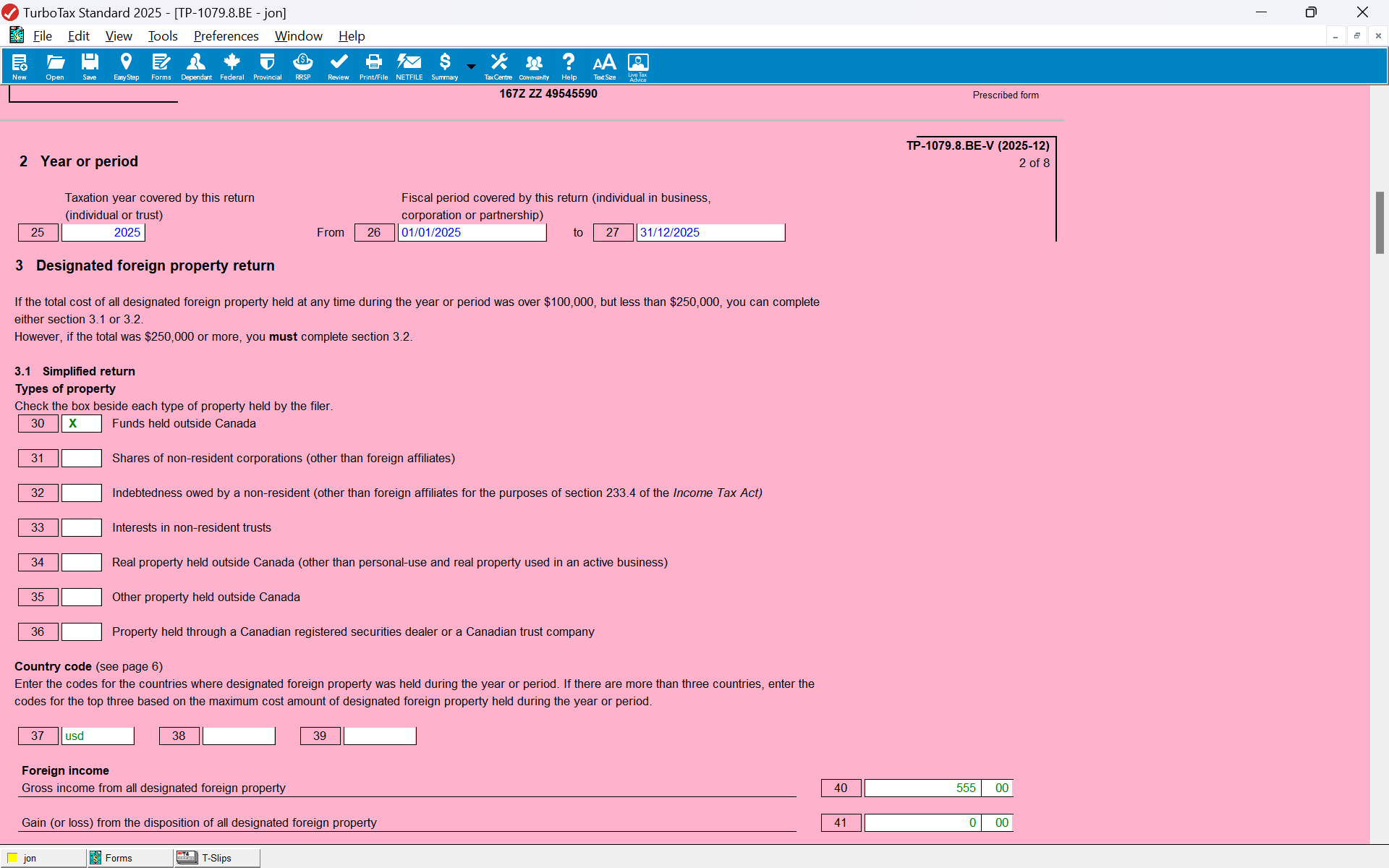
Quebec form TP-1079.8.BE-V is new in 2025. For the most part, its content should replicate the information found in the corresponding fields in federal form T1135. As of today, this is not the case. Values from the T1135 are not copied over (none are, at least for the case where "Part A" of the T1135 is used, I have not tried Part B). For example, fields such as "country codes" or the check box for "property held in a brokerage account" are blank and lines 40 and 41 remain at zero despite having a non-zero vale in the T1135.
I could probably override the values, but this might cause Netfile to fail. Please correct.
Thank you!
Topics:
posted
2 weeks ago
last updated
March 07, 2026
11:51 AM
1 Best answer
Accepted Solutions
- Mark as New
- Bookmark
- Subscribe
- Subscribe to RSS Feed
- Permalink
- Report Inappropriate Content
Error in form TP-1079.8.BE-V
Before calling support, I double-checked everything and found the source of the problem. I figured I should document this in case someone else experiences the same problem.
In form T1135, there is a set of two checkboxes on whether one is reporting foreign property above $250K or between $100K and $250K. Just picking the later and filling in Part A works for form T1135. However, it will not copy results to Quebec form TP-1079.8.BE-V. To ensure copying takes place, one must also select "tick the appropriate box for the method of filing" that appears in a tiny font just above the start of Part A section of the T1135. Doing so (ie ticking "Part A - simplified reporting method"), transfers data to the Quebec form.
Since I use the form method for filing my taxes, I do not know if the East-Step approach would have automatically ticked the Part A checkbox and thus result in TP-1079.8.BE-V being filled out properly. Maybe yes, maybe no.
Thank you for the support.
yesterday
8 Replies


- Mark as New
- Bookmark
- Subscribe
- Subscribe to RSS Feed
- Permalink
- Report Inappropriate Content
Error in form TP-1079.8.BE-V
It looks like you need to check off that you have specified foreign property in the Profile part of EasyStep for the TP-1079.8.BE-V form to get the info from the T1135.

a week ago
- Mark as New
- Bookmark
- Subscribe
- Subscribe to RSS Feed
- Permalink
- Report Inappropriate Content
Error in form TP-1079.8.BE-V
Unfortunately, what you propose does not work in my case. See details below.
1) The easy step check box for foreign property is ticked,

2) This results in the tickbox of T1 line 26600 to be filled properly indicating the need for from T1135

3) It also results in Form T1135 being filled properly (for obvious privacy reasons, I show only the portion of the form that does not contain dollar figures)

4) At the Quebec level, the tickbox indicating foreign property in excess of $100K found on Line 25 of TP1 is also properly ticked.

5) Nevertheless, contrarily to form T1135 which is properly filled, form TP-1079.8.BE-V is left blank

Though, in principle, it should not make a difference, in order for your teams to reproduce the error and correct it, it might be relevant to know that I fill in my return using the forms method, not the easy-step method. In response to your suggestion, I went back to the Easy-Step method to confirm the foreign property EasyStep question was properly answered and it was (see image after point 1 above).
I look forward to your response and thank you for your help.
a week ago

- Mark as New
- Bookmark
- Subscribe
- Subscribe to RSS Feed
- Permalink
- Report Inappropriate Content
Error in form TP-1079.8.BE-V
We suggest that you contact our product support team by phone.
They have access to tools we don't have here in Community, like screenshare, and see the issues to escalate into an investigation if needed.
Thanks
a week ago
- Mark as New
- Bookmark
- Subscribe
- Subscribe to RSS Feed
- Permalink
- Report Inappropriate Content
Error in form TP-1079.8.BE-V
Before calling support, I double-checked everything and found the source of the problem. I figured I should document this in case someone else experiences the same problem.
In form T1135, there is a set of two checkboxes on whether one is reporting foreign property above $250K or between $100K and $250K. Just picking the later and filling in Part A works for form T1135. However, it will not copy results to Quebec form TP-1079.8.BE-V. To ensure copying takes place, one must also select "tick the appropriate box for the method of filing" that appears in a tiny font just above the start of Part A section of the T1135. Doing so (ie ticking "Part A - simplified reporting method"), transfers data to the Quebec form.
Since I use the form method for filing my taxes, I do not know if the East-Step approach would have automatically ticked the Part A checkbox and thus result in TP-1079.8.BE-V being filled out properly. Maybe yes, maybe no.
Thank you for the support.
yesterday
- Mark as New
- Bookmark
- Subscribe
- Subscribe to RSS Feed
- Permalink
- Report Inappropriate Content
Error in form TP-1079.8.BE-V
Thank you for updating us. We appreciate it!
yesterday

- Mark as New
- Bookmark
- Subscribe
- Subscribe to RSS Feed
- Permalink
- Report Inappropriate Content
Error in form TP-1079.8.BE-V
I also use forms to file with turbotax but the T1135 does not follow through to the to the TP-1079.8.BE-V. The foreign property reported is over 250K$ so I must use part B and the appropriate boxes in small font are ticked.
Maybe the solution works for part A users but not for part B. I have already spent 70 minutes on the phone with help desk. A little frazzled to say the least
3 hours ago
- Mark as New
- Bookmark
- Subscribe
- Subscribe to RSS Feed
- Permalink
- Report Inappropriate Content
Error in form TP-1079.8.BE-V
I did a quick test on mine, switching from Part A to Part B just to see if it would fail like it did for you. In my case, the test data I put in Part B did wind up on the TP-1079.8.BE-V. For clarity, the T1135 was like this:

The checkboxes on your T1135 are probably as shown here, but I just wanted to make sure you ticked both red boxes in case it was that simple...
I fully understand the frustration... Good luck!
2 hours ago

- Mark as New
- Bookmark
- Subscribe
- Subscribe to RSS Feed
- Permalink
- Report Inappropriate Content
Error in form TP-1079.8.BE-V
thanks @TaiWai62 for sharing!
was having the same issue- similar but not exact. Another trick that worked is just toggling between simplifed and detailed. Once I did that, everything updated magically. Maybe because the original info was entered prior to the March 17th update
2 hours ago
Unlock tailored help options in your account.
Related Content

Horia
New Member

SaskTaxFiler
Level 2

KA331
Level 2

jpark2026
New Member

user17736823234
Level 1