
 Open TurboTax
 Sign In
Why sign in to the Community?
- Submit a question
- Check your notifications


- TurboTax Support
- :
- Discussions
- :
- Troubleshooting
- :
- Troubleshooting
- :
- Turbo Tax Premier Desktop - Federal & Quebec
Turn on suggestions
Auto-suggest helps you quickly narrow down your search results by suggesting possible matches as you type.
Showing results for
Announcements
- Subscribe to RSS Feed
- Mark Topic as New
- Mark Topic as Read
- Float this Topic for Current User
- Bookmark
- Subscribe
- Printer Friendly Page

- Mark as New
- Bookmark
- Subscribe
- Subscribe to RSS Feed
- Permalink
- Report Inappropriate Content
Turbo Tax Premier Desktop - Federal & Quebec
There is a problem in automatically transferring the capital gains amount from the Federal T4PS slip Box 34 to the Quebec RL-25, Box B. Once you click Box B on RL-25 you get another box where the capital gains amount should appear. But it does not transfer and if you want to put the amount it asks you to override by pressing F2. If you override you cannot NetFile so there is a glitch in the software regarding this slip. Other amounts in other boxes automatically transfer from T4PS slip to RL-25 , except the Box B, the capital gains does not transfer from the T4PS capital gains. This needs to be corrected. Last year's Turbo Tax Software 2024 everything worked well. So now the capital gains appear on the Federal return but not on the Quebec provincial return. Needs to be fixed!!!
posted
March 17, 2026
11:46 AM
last updated
March 17, 2026
11:46 AM
5 Replies


- Mark as New
- Bookmark
- Subscribe
- Subscribe to RSS Feed
- Permalink
- Report Inappropriate Content
Turbo Tax Premier Desktop - Federal & Quebec
We suggest that you contact our Product Support team. They have access to tools we don't have here in Community, like screenshare, and can investigate this issue for you.
Thank you for choosing TurboTax.
March 17, 2026
2:55 PM
- Mark as New
- Bookmark
- Subscribe
- Subscribe to RSS Feed
- Permalink
- Report Inappropriate Content
Turbo Tax Premier Desktop - Federal & Quebec
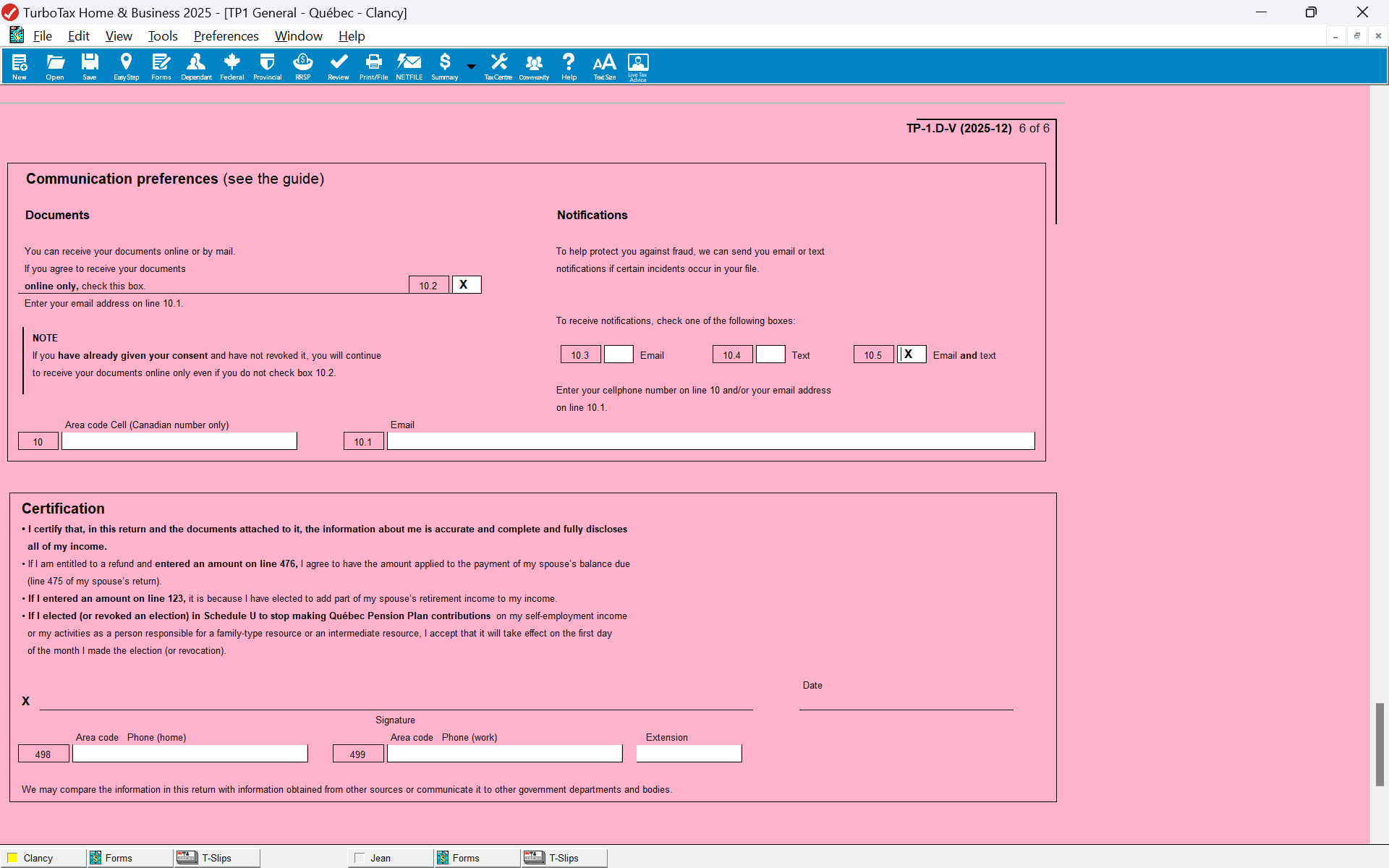
already contacted and they said they are working on correcting the bugs in the software but so far nothing has been done. Also on the Quebec form at the end where is says communication preferences it does not allow you to click any of the boxes like email, text or the combined email and text. Cannot put an X. This software is really bad this year. I just hope they are working on updates and correct all of these problems, or else if we override anything we have to mail the returns.
March 20, 2026
11:35 AM
- Mark as New
- Bookmark
- Subscribe
- Subscribe to RSS Feed
- Permalink
- Report Inappropriate Content
Turbo Tax Premier Desktop - Federal & Quebec
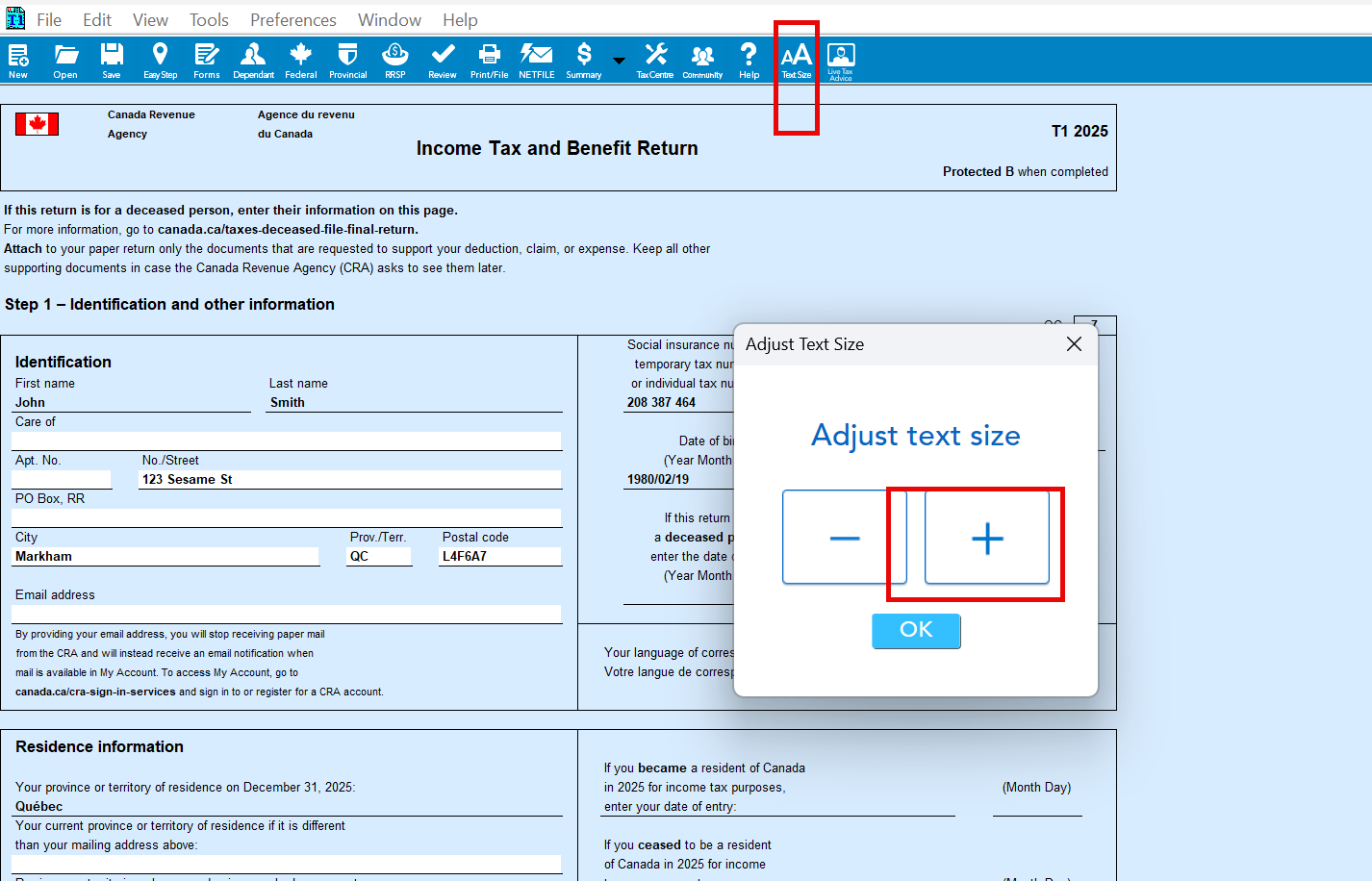
Have you tried increasing the font size within TurboTax, as you are unable to type in forms mode?
Try changing the font size and see if it allows you to type. Also make sure that software is up-to-date.
Thank you for choosing TurboTax.
March 20, 2026
11:59 AM
- Mark as New
- Bookmark
- Subscribe
- Subscribe to RSS Feed
- Permalink
- Report Inappropriate Content
Turbo Tax Premier Desktop - Federal & Quebec
yes did do that but it enlarges the return no the top control bar
March 20, 2026
12:29 PM

- Mark as New
- Bookmark
- Subscribe
- Subscribe to RSS Feed
- Permalink
- Report Inappropriate Content
Turbo Tax Premier Desktop - Federal & Quebec
@alfieri1957 If you have already given your consent to receive your documents online and have not revoked it, then leaving this section blank will not change how you get documents from Revenu Quebec.

March 20, 2026
1:28 PM
Unlock tailored help options in your account.
Related Content

Sparlg3
New Member

user17761174533
New Member
alfieri1957
Level 2

user17740031779
New Member
alfieri1957
Level 2