
 Open TurboTax
 Sign In
Why sign in to the Community?
- Submit a question
- Check your notifications


- TurboTax Support
- :
- Discussions
- :
- Navigating TurboTax
- :
- Getting started
- :
- I do not want the TurboTax Assist & Review Deluxe, how do I remove it
Turn on suggestions
Auto-suggest helps you quickly narrow down your search results by suggesting possible matches as you type.
Showing results for
- Subscribe to RSS Feed
- Mark Topic as New
- Mark Topic as Read
- Float this Topic for Current User
- Bookmark
- Subscribe
- Printer Friendly Page


- Mark as New
- Bookmark
- Subscribe
- Subscribe to RSS Feed
- Permalink
- Report Inappropriate Content
I do not want the TurboTax Assist & Review Deluxe, how do I remove it
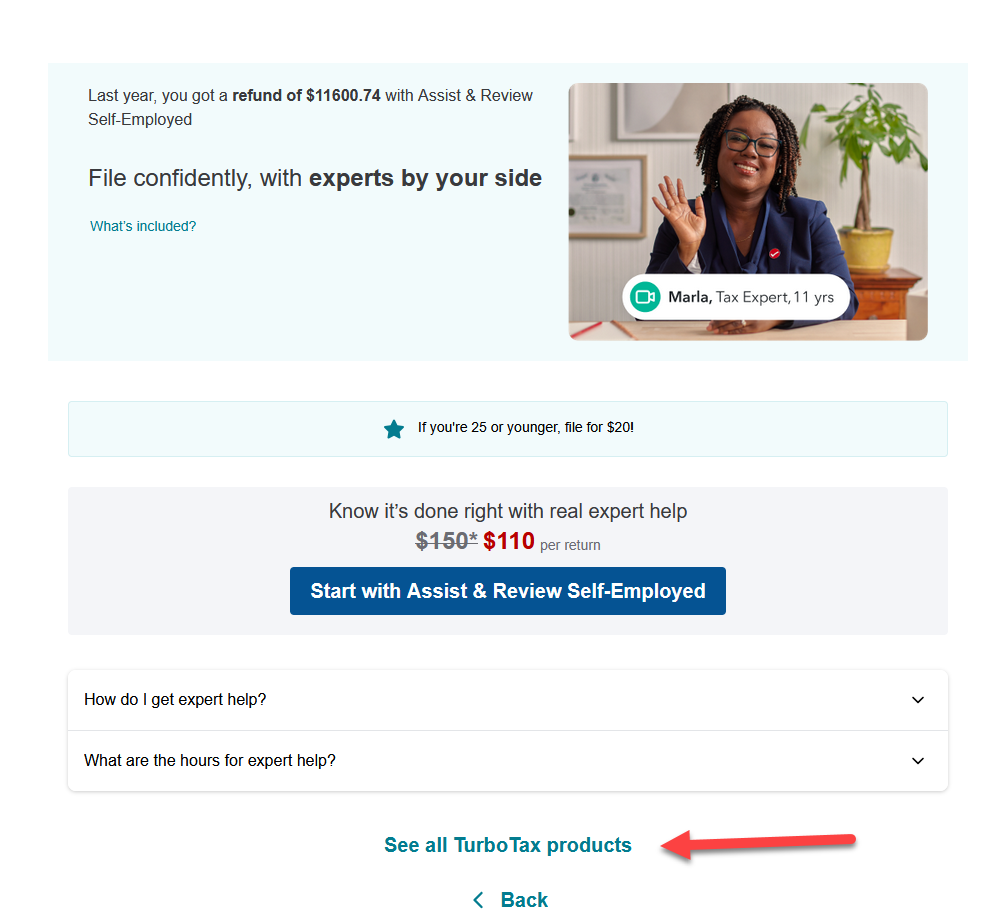
If you transfer a return from the previous year, it will start off with whatever version you used in that year. You have the option to change it by selecting "See all TurboTax Products".

March 12, 2026
4:01 PM

- Mark as New
- Bookmark
- Subscribe
- Subscribe to RSS Feed
- Permalink
- Report Inappropriate Content
I do not want the TurboTax Assist & Review Deluxe, how do I remove it
There was no way to opt out. I will no longer use your service. I am willing to pay for normal but do not need any assistance and it seems like I have to pay. I work for a financial institution and I do not need any assistance. If I need to start a new return I will. This is just a money making scheme and I will report to the BBB if I cannot do my taxes without a 200$ upgrade.
March 14, 2026
3:42 PM

- Mark as New
- Bookmark
- Subscribe
- Subscribe to RSS Feed
- Permalink
- Report Inappropriate Content
I do not want the TurboTax Assist & Review Deluxe, how do I remove it
what a scam! If you can't uncheck it, Turbotax is forcing people to pay for this useless feature, because it takes too much effort to start the tax return over again to remove this option. What a scam TurboTax. This should be a button you can select or unselect!!
March 24, 2026
6:05 PM
- Mark as New
- Bookmark
- Subscribe
- Subscribe to RSS Feed
- Permalink
- Report Inappropriate Content
I do not want the TurboTax Assist & Review Deluxe, how do I remove it
what a scam, ripping customers off with this deception.
March 24, 2026
6:06 PM

- Mark as New
- Bookmark
- Subscribe
- Subscribe to RSS Feed
- Permalink
- Report Inappropriate Content
I do not want the TurboTax Assist & Review Deluxe, how do I remove it
@user17744006232 Unfortunately, there is no option to remove or upgrade this service once it is added. In Turbo Tax, you can select "No Thanks" to bypass the upgrade page. Once you choose to add that service and upgrade, it will automatically upgrade the product based on your selection/choice.
To switch to a different version without upgrading, restart your return. If you have not used the expert help, please contact our product support or submit a partial refund request via this form: https://turbotax.community.intuit.ca/turbotax-support/en-ca/help-article/taxation/get-refund-turbota...
March 25, 2026
5:24 AM

- Mark as New
- Bookmark
- Subscribe
- Subscribe to RSS Feed
- Permalink
- Report Inappropriate Content
I do not want the TurboTax Assist & Review Deluxe, how do I remove it
This is so bloody greasy and I encourage people to contact the better business bureau to launch a formal complaint against Intuit. When doing my return this year I made a point of specfically choosing the Self Employed product without the Expert Assist, but then I got a popup option that said "Congratualtions, we have added the Expert Assist feature" and now I have no way to get rid of the crap that I didn't want or choose. This is bordering on criminal behavoir by Intuit, and I've now wasted an afternoon on the phone with none of the support reps able to resolve the problem.
April 6, 2026
1:42 PM
- Mark as New
- Bookmark
- Subscribe
- Subscribe to RSS Feed
- Permalink
- Report Inappropriate Content
I do not want the TurboTax Assist & Review Deluxe, how do I remove it
When I went to file mine today as well I specifically selected the product without Expert Assist, and after clicking to start my return with the product I wanted, it said "Congratulations we have added Expert Assist to your return". This is so greasy of Intuit.
April 6, 2026
1:54 PM

- Mark as New
- Bookmark
- Subscribe
- Subscribe to RSS Feed
- Permalink
- Report Inappropriate Content
I do not want the TurboTax Assist & Review Deluxe, how do I remove it
Bull**bleep**e. I do each year with you and this year it did not prompt me for pricing options you liars.
Turbotax is a ripoff now and shady. It was cool at first but like everything is unethical to rip off filers...especially past users.
April 10, 2026
3:16 PM

- Mark as New
- Bookmark
- Subscribe
- Subscribe to RSS Feed
- Permalink
- Report Inappropriate Content
I do not want the TurboTax Assist & Review Deluxe, how do I remove it
I am having the same issue as well. $150 per return and I'm an accountant FFS. Seriously considering not using turbotax again, as this is a serious scam. There was no option to downgrade from the self-employment income module I had to use last year, but wan not required this year. Terrible product.
April 19, 2026
9:12 AM
- Mark as New
- Bookmark
- Subscribe
- Subscribe to RSS Feed
- Permalink
- Report Inappropriate Content
I do not want the TurboTax Assist & Review Deluxe, how do I remove it
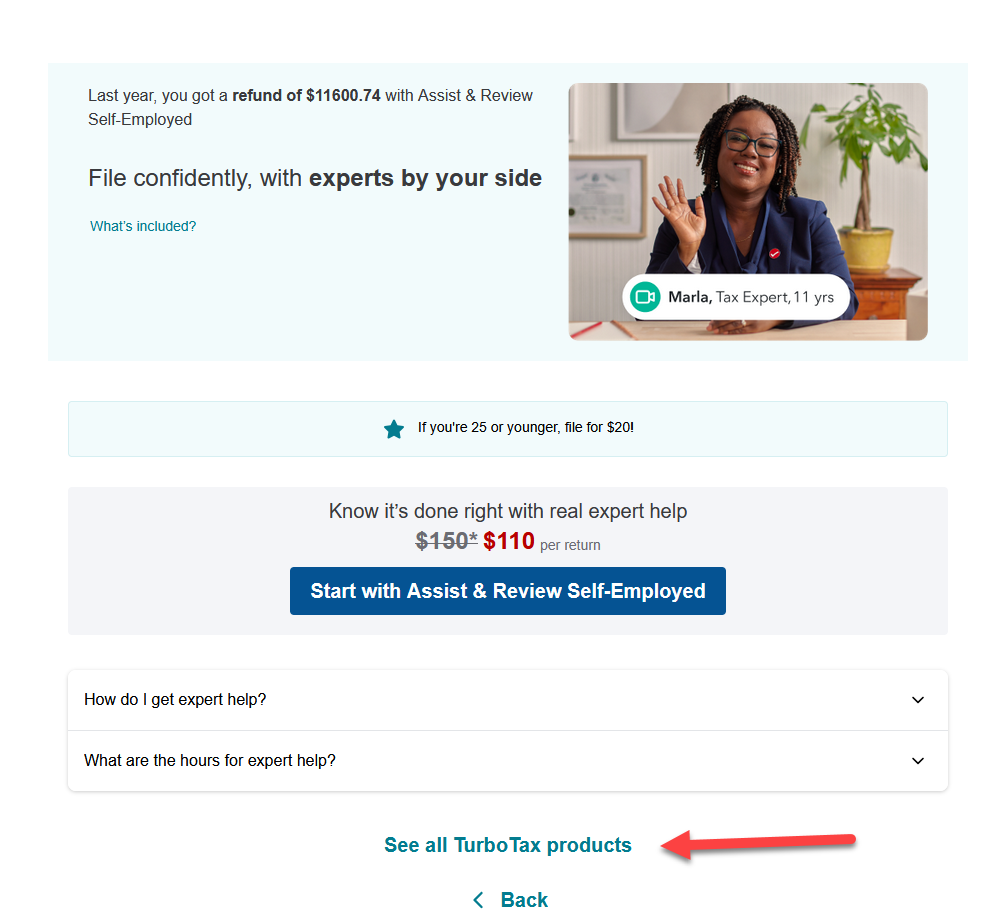
@LeighnAbby If you transfer a return from the previous year, it will start off with whatever version you used in that year. You have the option to change it by selecting "See all TurboTax Products".
April 19, 2026
10:39 AM
Unlock tailored help options in your account.
Related Content

leoarv88c
New Member

user17774822280
New Member
holzfam4
New Member

aizaasif
New Member

LittleFlower88
New Member