
 Open TurboTax
 Sign In
Why sign in to the Community?
- Submit a question
- Check your notifications


- TurboTax Support
- :
- Discussions
- :
- Navigating TurboTax
- :
- Self-employed
- :
- where are the forms like T1 etc ?
Turn on suggestions
Auto-suggest helps you quickly narrow down your search results by suggesting possible matches as you type.
Showing results for
- Subscribe to RSS Feed
- Mark Topic as New
- Mark Topic as Read
- Float this Topic for Current User
- Bookmark
- Subscribe
- Printer Friendly Page

- Mark as New
- Bookmark
- Subscribe
- Subscribe to RSS Feed
- Permalink
- Report Inappropriate Content
where are the forms like T1 etc ?
posted
Sunday
last updated
March 29, 2026
7:12 PM
5 Replies


- Mark as New
- Bookmark
- Subscribe
- Subscribe to RSS Feed
- Permalink
- Report Inappropriate Content
where are the forms like T1 etc ?
The T1 General is the "master" document. If you are looking for specific slips like a T4 or T5, these aren't "forms" in the return; they are "worksheets" that feed into the T1. In TurboTax, you usually find these in the "Income" section of the interview.
How do I print a copy of my tax return in TurboTax?
Thank you for choosing TurboTax.
Monday
- Mark as New
- Bookmark
- Subscribe
- Subscribe to RSS Feed
- Permalink
- Report Inappropriate Content
where are the forms like T1 etc ?
These form are generated when you fill the necessary informations. Before there is way to access them before submit the return. I don't know where is it now or if we can't access them anymore. Like if you use wealthsimple, it's shows at the bottom of the page. It's inconvenient to cannot see them before submit them to CRA. Maybe it's time to switch.
Monday

- Mark as New
- Bookmark
- Subscribe
- Subscribe to RSS Feed
- Permalink
- Report Inappropriate Content
where are the forms like T1 etc ?
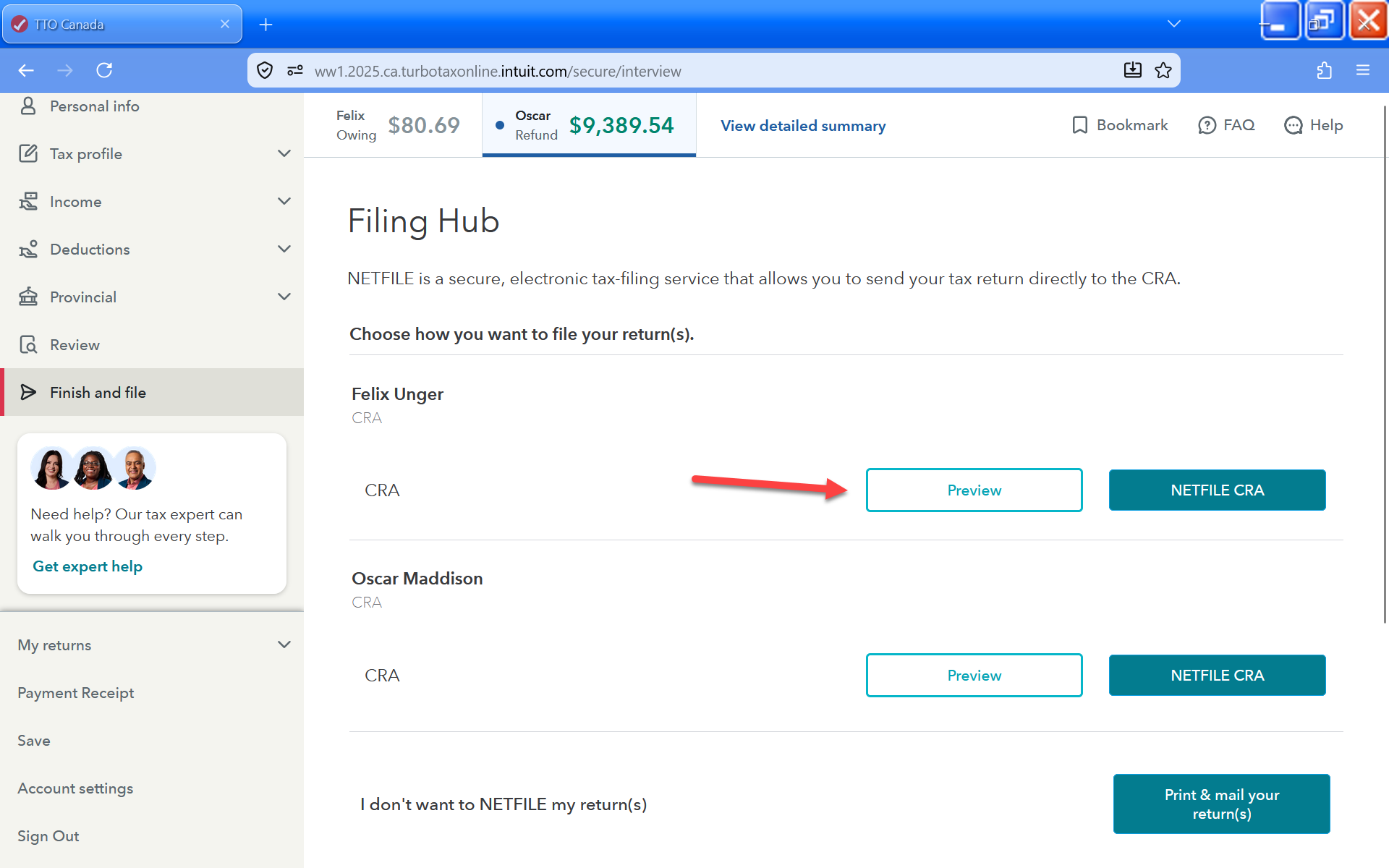
If you are using TurboTax Do It Yourself (Online), when you get to the part where you file your return, you'll get the option to download a PDF preview. This will have your T1 and any other forms that make up your return.

Monday
- Mark as New
- Bookmark
- Subscribe
- Subscribe to RSS Feed
- Permalink
- Report Inappropriate Content
where are the forms like T1 etc ?
Can you still adjust them if you need it after you come this far ?
Monday
- Mark as New
- Bookmark
- Subscribe
- Subscribe to RSS Feed
- Permalink
- Report Inappropriate Content
where are the forms like T1 etc ?
If you're wondering if you can add, remove, or delete any slips or forms before filing, the answer is yes. You can do so by returning to that section and making changes. If you have filed the return, you can only make amendments / refile your return after you receive a Notice of Assessment from CRA.
yesterday
Unlock tailored help options in your account.
Related Content

enes
New Member

mackbig
Level 3