
 Open TurboTax
 Sign In
Why sign in to the Community?
- Submit a question
- Check your notifications


- TurboTax Support
- :
- Discussions
- :
- Troubleshooting
- :
- Troubleshooting
- :
- FHSA asking for information and showing in error when I never said I had one!
Turn on suggestions
Auto-suggest helps you quickly narrow down your search results by suggesting possible matches as you type.
Showing results for
Announcements
- Subscribe to RSS Feed
- Mark Topic as New
- Mark Topic as Read
- Float this Topic for Current User
- Bookmark
- Subscribe
- Printer Friendly Page

- Mark as New
- Bookmark
- Subscribe
- Subscribe to RSS Feed
- Permalink
- Report Inappropriate Content
FHSA asking for information and showing in error when I never said I had one!
During the review in Turbo Tax the program said there was a FHSA error, surprise for me as I never checked that I had or contributed to one. Now it wants me to indicate the year I first opened my first FHSA... ?
I can't seem to clear this error, what can I do to clear it or do I need to delete every thing that I have entered and start again?
Thanks!
Topics:
posted
5 hours ago
last updated
March 16, 2026
12:25 PM
5 Replies


- Mark as New
- Bookmark
- Subscribe
- Subscribe to RSS Feed
- Permalink
- Report Inappropriate Content
FHSA asking for information and showing in error when I never said I had one!
Try going into Forms mode and look to see if any forms that you don't need are open. If you do see one that you don't need, choose Edit > Forms > Clear Current Form, then Edit > Forms > Close Unused Forms to get rid of it.

3 hours ago
- Mark as New
- Bookmark
- Subscribe
- Subscribe to RSS Feed
- Permalink
- Report Inappropriate Content
FHSA asking for information and showing in error when I never said I had one!
Hmmm, that didn't seem to work, cleared the form, then closed unused forms and the review still brings up this.

Additionally, I did the steps again, cleared the form, closed unused forms, saved my work and closed then reopened Turbo Tax went to Easy Step Method, then jumped ahead to begin the review and see this. Looks like the "No" box has been cleared and the error is back.

2 hours ago
- Mark as New
- Bookmark
- Subscribe
- Subscribe to RSS Feed
- Permalink
- Report Inappropriate Content
FHSA asking for information and showing in error when I never said I had one!
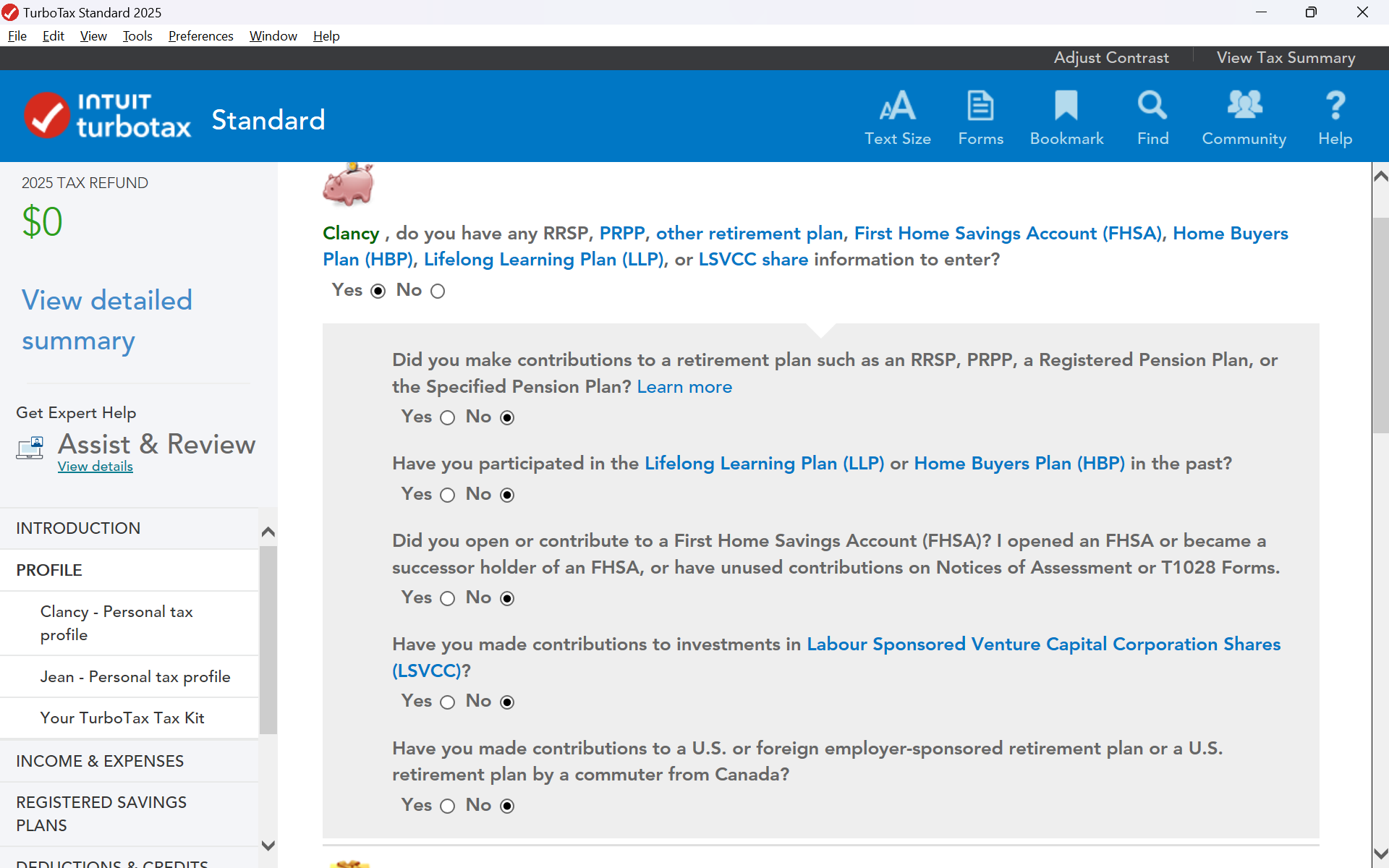
In EasyStep Mode, select Profile> Your Personal Tax Profile, and then continue to the 2nd page. In the top section, make sure that the question regarding the FHSA is set to "No".
If you are still not able to resolve this issue, please contact our phone support team for more assistance.
2 hours ago
- Mark as New
- Bookmark
- Subscribe
- Subscribe to RSS Feed
- Permalink
- Report Inappropriate Content
FHSA asking for information and showing in error when I never said I had one!
Yes, I did verify that answer, it is set to "no". So I will call into phone support or erase and start over.
Thanks.

an hour ago
- Mark as New
- Bookmark
- Subscribe
- Subscribe to RSS Feed
- Permalink
- Report Inappropriate Content
FHSA asking for information and showing in error when I never said I had one!
I spoke with phone support, they couldn't clear up the issue, suggested it could be a form coming from CRA during the import process, I said doubtful as I did not see anything to do with FHSA.
Suggestions are: 1) delete saved data and try again with CRA import 2) delete saved data and start again and manually enter all tax information.
Will let you all know...
2m ago
Unlock tailored help options in your account.
Related Content

user17736823234
New Member

user17735259348
New Member

user17732738516
Level 1

dicklloyd44
New Member

hivashhp
New Member